

Capterra offers objective, independent research and verified user reviews. We may earn a referral fee when you visit a vendor through our links.
Learn more
Our commitment
Independent research methodology
Capterra’s researchers use a mix of verified reviews, independent research and objective methodologies to bring you selection and ranking information you can trust. While we may earn a referral fee when you visit a provider through our links or speak to an advisor, this has no influence on our research or methodology. Learn more
How Capterra verifies reviews
Capterra carefully verified over 2.5 million+ reviews to bring you authentic software and services experiences from real users. Our human moderators verify that reviewers are real people and that reviews are authentic. They use leading tech to analyze text quality and to detect plagiarism and generative AI. Learn more
How Capterra ensures transparency
Capterra lists all providers across its website—not just those that pay us—so that users can make informed purchase decisions. Capterra is free for users. Software and service providers pay us for sponsored profiles to receive web traffic and sales opportunities. Sponsored profiles include a link-out icon that takes users to the provider’s website. Learn more
Human Resources Software
HR software, also known as Human Resource Software, HR Systems, or HRMS Systems, is a suite of tools that enable organisations to manage human capital. Human resources information software allows HR teams to manage a variety of necessary HR functions which include onboarding, employee benefits, attendance, salary, and more. Many Human Resource Management systems can be integrated with applicant tracking and payroll software platforms. HRMS is related to Applicant Tracking software, Payroll Software, Performance Appraisal software and Workforce Management software. Compare product reviews and features to help find the best HR Software for your business in the UK. Read more Read less
The best HR software of 2025 for UK businesses
Over half (52%) of UK companies have adopted HR software in the past last year, with 39% of firms using it for even longer, leaving just 10% of companies yet to try it [a].
UK businesses are increasingly valuing HR platforms. Whether you’re new to HR management software or you’re looking to refresh your toolkit, choosing the right system can be daunting. To help you, we’ve analysed 11,534 verified user reviews to provide an overview of the most popular HR software solutions.
If these tools don’t meet your specific requirements, check out our catalogue to identify the best human resources system for your needs.
Top solutions

BambooHR

Rippling

Workday HCM

Deel
ADP Workforce Now
Sage HR

Lattice

BrightHR
Workable
How we picked the software on this list
Our independent and objective research is based on market demand signals in the UK along with an analysis of our proprietary data. This includes product information and verified user reviews in the last two years as of June 2025. Sponsorship or client status has no bearing on how we select this list. Read the complete methodology for Capterra’s Best Product Lists.
 Local product
Highly Rated for Time & Attendance
Top rated feature:
Compensation Management
Starting Price:
£180.00/month
Free trial
Cezanne HR is a reliable and customisable HRIS solution with a 4.37 out of 5 rating from over 199 verified user reviews. It streamlines key HR functions such as payroll, onboarding, and performance management, making them efficient and easier to manage. The platform supports global companies and offers extensive customisation options. Users appreciate the responsive customer support and the ability to integrate various HR tasks within a single interface. The system is user-friendly and cost-effective, catering to diverse company needs.
Features
-
Employee Database: Reviewers appreciate having all employee information in one place, with easy updates and secure data input. Customisable reports and search functions are also valued.
-
HR Management: Users highlight the system's ability to manage staff data, analytics, and customisation options, though some note the need for improvements and concerns about rising costs.
-
Self Service Portal: Cezanne HR users find the self-service portal user-friendly and efficient for updating personal data, reducing paperwork, and managing time off.
-
Vacation/Leave Tracking: Reviewers value the ease of booking and approving leave, visibility of absences, and useful reports, though some find certain reporting features lacking.
-
Access Controls/Permissions: Users appreciate the ability to set different access levels for staff, though some find the setup process complex and desire easier role management.
-
Time Off Management: Cezanne HR users find time off management flexible and easy to use, with helpful absence tracking and reporting, though some mention occasional process flow issues.
Pros & cons
Pros:
Users appreciate the support team for their responsiveness and helpfulness, ensuring quick resolution of issues and smooth implementation. The HR system streamlines key functions like payroll, onboarding, and performance management, making processes more efficient and reducing administrative burdens. Employee information management is praised for its reliability and ease of use, centralising data and simplifying tasks like booking holidays and tracking time. Customer service is highly regarded for its commitment to satisfaction, quick responses, and willingness to consider feedback. Data management features are valued for their comprehensive reporting capabilities and ease of data export.
Cons:
However, users find reporting cumbersome and difficult to customise, often requiring multiple reports to gather all necessary data. Customisation options are limited, making it challenging to tailor the system to specific needs. Notifications can be overwhelming and lack flexibility, with some users unable to turn off unnecessary alerts. Form management is seen as slow and cumbersome, requiring manual interventions and lacking features like digital signatures.
Value for Money
23 reviews discussing Value for Money, 100% positive.
Most users consider Cezanne HR to be excellent value for money, highlighting its affordability and fair pricing structure. They appreciate the low initial set-up costs and the subscription model, which is cost-effective and includes most HR functionalities. Reviewers find the software's extensive features and continuous updates particularly valuable. The availability of comprehensive support materials, such as getting started documents and videos, along with a free guided online tour, adds to the perceived value. Users also note that the software is easy to implement and cost-effective for businesses of various sizes. However, one user mentions that the demonstrated version was more expensive than initially indicated.
Popular Integrations
-
Pinpoint: Users integrate Pinpoint with Cezanne HR to streamline the onboarding process by automatically transferring new starter information, saving time and reducing manual data entry. --- based on 1 reviews, 1 snippets.
-
Teamtailor: Users integrate Teamtailor with Cezanne HR for automation and to ensure accurate data entry, improving efficiency in managing recruitment and HR processes. --- based on 1 reviews, 1 snippets.
Highly Rated & Free Trial
Top rated feature:
Employee Management
Starting Price:
US$10.00/month
Free trial
BambooHR is a comprehensive HR management software with a 4.59 out of 5 rating from over 2,941 verified user reviews. It centralises employee data, automates HR tasks, and enhances the employee experience with self-service options. Key features include onboarding, performance tracking, time-off management, payroll integration, and robust reporting tools. The platform is praised for its user-friendly interface and ability to streamline HR processes, making it suitable for small to medium-sized businesses.
Features
-
Employee Database: Reviewers highlight its centralised data management, customisation options, compliance tracking, and user-friendly interface.
-
Online Time Tracking: Users appreciate its ease of use, though they note limitations in features like break tracking and monthly hour calculations.
-
HR Management: Reviewers value its comprehensive HR solutions, employee self-service, and ease of use, but some find the new interface less intuitive.
-
Vacation/Leave Tracking: Users praise its user-friendly interface, real-time tracking, and approval process, though some mention integration issues with payroll systems.
-
Time Off Management: Reviewers appreciate its ease of use, real-time tracking, and approval process, but some find it challenging to set up initially.
-
Online Time Clock: Users find it easy to use and helpful for payroll, but some desire more advanced features like geo-fencing and automatic lunch deductions.
Pros & cons
Pros:
Reviewers appreciate BambooHR for its robust employee management capabilities, highlighting its user-friendly interface and centralised database that simplifies accessing and managing employee information. The platform's comprehensive features, such as time-off requests, performance reviews, and benefits management, are particularly valued for enhancing workflow efficiency. Users also commend the HR management functionalities, noting the ease of handling HR tasks and the intuitive design that supports seamless integration with other tools. Employee tracking is another strong point, with automated reminders and centralised data making it easier to monitor performance, time-off, and onboarding processes.
Additionally, the customer support receives high praise for its responsiveness and helpfulness, ensuring users can resolve issues quickly. The onboarding process is streamlined and customisable, allowing companies to create tailored experiences that reflect their culture and meet specific needs.
Cons:
However, users express concerns about BambooHR's payroll management, citing issues with integration, limited functionality, and the need for manual interventions. The pricing structure is also a point of contention, with some finding it expensive, especially for smaller businesses. Reporting capabilities are another area where users feel improvements are needed, as the current options are seen as limited and not sufficiently customisable to meet all organisational needs.
Value for Money
359 reviews discussing Value for Money, 60% positive.
Reviewers have mixed opinions on BambooHR's value for money. They appreciate the variety of features offered at a competitive price, especially for small to medium-sized businesses. Users highlight the availability of a free trial, which allows them to explore the software before committing. They also value the customisable pricing model that accommodates growth without significant cost increases. Many find it cost-effective, saving time and money by streamlining HR processes and reducing paperwork.
However, some users feel that BambooHR is expensive, particularly for small businesses or those with limited budgets. They mention that additional features often come with higher pricing tiers, and the overall cost can escalate quickly as the company grows. There are also concerns about the lack of transparency in pricing and the need for multiple accounts to manage different tax IDs, which can be inefficient and costly.
Popular Integrations
-
Indeed: Users integrate BambooHR with Indeed to streamline job postings, track candidates, and manage the hiring process efficiently, despite some issues with syncing and premium services. --- based on 49 reviews, 33 snippets.
-
Slack: Users integrate BambooHR with Slack to receive notifications, manage PTO requests, and streamline HR workflows, although some find the integration limited and needing improvement. --- based on 40 reviews, 24 snippets.
-
Google Calendar: Users integrate BambooHR with Google Calendar to automatically update leave events, track PTO, and manage out-of-office schedules, enhancing visibility and coordination. --- based on 30 reviews, 14 snippets.
-
Okta: Users integrate BambooHR with Okta for single sign-on and multifactor authentication, ensuring secure and seamless access to HR systems and other applications. --- based on 15 reviews, 6 snippets.
Highly Rated for Time Off Management
Top rated feature:
Onboarding
Starting Price:
£7.00/month
Free trial
Rippling is an integrated HR, payroll, and IT management platform with a 4.87 out of 5 rating from over 3,924 verified user reviews. The software consolidates functions such as payroll processing, benefits administration, onboarding, device management, time tracking, expense management, and compliance into a single dashboard. Users highlight its automation capabilities, customizable workflows, and centralized access to employment information, supporting both local and international teams while streamlining administrative processes and improving operational efficiency.
Features
- Direct Deposit: Rippling users consistently highlight the ease and flexibility of setting up direct deposit, including splitting paychecks across multiple accounts, timely and reliable payments, and instant notifications; some mention minor confusion between dollar and percentage allocations during setup.
- Payroll Management: Reviewers of Rippling value its intuitive payroll management, real-time tracking, and integration with time tracking and benefits, though some note initial setup complexity, pop-up distractions, and rare issues with expedited payroll or tax calculations.
- Payroll Reporting: Users appreciate Rippling’s detailed, intuitive payroll reporting with easy access to pay breakdowns, deductions, and historical data, CSV exports, and integration with platforms like QBO, though some desire more customizable reporting options.
- Benefits Management: Rippling users find benefits management streamlined for enrollment, plan comparison, and updates, with all info in one place and integrations like Rightway, but some report setup confusion, calculation errors, and limited customer support.
- Payroll Document Preparation: Reviewers highlight how Rippling makes payroll document preparation simple and timely, with digital access, reminders, and easy downloads. However, a few mention rare filing errors or issues with government reporting and customer support.
- Tax Compliance: Users value Rippling’s automated tax calculations, multi-state compliance, and timely alerts, but some report occasional withholding errors, challenges with state registrations, and inconsistent customer support for complex scenarios.
Pros & cons
Pros:
Reviewers consistently highlight Rippling’s ease of use, noting its intuitive interface and clear navigation that make daily HR tasks, payroll management, and benefits tracking straightforward. Users appreciate having all essential employee management tools—like time tracking, onboarding, and pay information—centralized in one platform, which saves time and reduces administrative hassle. The ability to access pay stubs, manage PTO, and handle benefits in a single, organized dashboard is valued, especially for remote teams.
Cons:
On the downside, users frequently mention frustrations with the login process, including frequent logouts and cumbersome two-factor authentication, as well as limited reporting customization and clunky electronic signature workflows.
Value for Money
262 reviews discussing Value for Money, 72% positive.
Most reviewers indicate that Rippling offers strong value for money by consolidating HR, payroll, benefits, and expense management into a single, user-friendly platform, which saves them significant time and reduces administrative costs. They appreciate the flexibility of a la carte pricing, affordable payroll processing, and the ability to customize features to fit their needs. Users highlight cost savings compared to previous providers and praise the competitive pricing for the breadth of included functionalities. However, they say the lack of transparent pricing, add-on fees, and escalating costs for additional modules can make budgeting difficult, especially for smaller businesses.
Popular Integrations
-
Slack: Users integrate Rippling with Slack to automate onboarding, manage user accounts, and streamline access to communication channels, especially for remote teams needing centralized account provisioning. --- based on 43 reviews, 26 snippets.
-
Google Workspace: Integration with Google Workspace automates employee email setup, streamlines onboarding/offboarding, and synchronizes user management, supporting organizations that rely on Google tools for daily operations. --- based on 30 reviews, 16 snippets.
-
Gmail: Users connect Rippling with Gmail to automate new employee account provisioning, simplify onboarding tasks, and centralize access to email and related systems for new hires. --- based on 18 reviews, 7 snippets.
-
Lattice: Rippling integrates with Lattice to import employee data, link HR information, and facilitate feedback and performance management by synchronizing personnel records between the two platforms. --- based on 16 reviews, 9 snippets.
Highly Rated for Training Management
Top rated feature:
Benefits Management
Starting Price:
No pricing found
Free trial
Workday HCM holds a 4.45 out of 5 rating from over 1,608 verified user reviews, offering a unified, cloud-based platform that integrates HR management, payroll, benefits, talent management, and workforce planning. Reviewers highlight its self-service features, real-time analytics, and robust automation, supporting tasks such as onboarding, time tracking, and performance management. The platform’s scalability, integration capabilities, and secure environment make it suitable for organizations seeking comprehensive HR solutions in a single system.
Features
- Vacation/Leave Tracking: Workday HCM users value the intuitive leave tracking, easy PTO requests, real-time balance updates, and clear calendar views, though a few mention occasional update delays or confusion.
- Direct Deposit: Reviewers highlight the ease of setting up, managing, and splitting direct deposit across multiple accounts, with secure, timely payments and transparent pay breakdowns, though some find the process delicate.
- Payroll Reporting: Users appreciate customizable, real-time payroll reports, historical data access, and compliance support, but some note limited reporting features and a non-intuitive interface.
- Payroll Management: Workday HCM users find payroll management centralized, flexible, and accessible for all employees, with real-time insights and integration, though some cite complexity and occasional confusion in navigation.
- Employee Management: Reviewers of Workday HCM praise comprehensive employee data management, streamlined onboarding, performance tracking, and compliance, with easy access to profiles and integration with other tools.
- Self Service Portal: Users appreciate the self-service portal’s user-friendly, all-in-one access to HR tasks, payroll, and benefits, enabling independence, though some initially find the interface confusing.
Pros & cons
Pros:
Reviewers consistently highlight Workday’s ease of use, noting its intuitive interface and straightforward navigation for both web and mobile access. Users appreciate the clean, customizable dashboard and the wide range of features that support HR, payroll, and employee management tasks. Many find it convenient to access pay stubs, benefits, and time-off requests in one centralized platform, which streamlines daily operations and increases transparency.
Cons:
However, users report frustrations with customer support responsiveness, complex document submission processes, and cumbersome reporting tools. Login and password management, as well as notification handling, are also cited as areas needing improvement due to frequent authentication issues and confusing alerts.
Value for Money
138 reviews discussing Value for Money, 54% positive.
Reviewers say Workday HCM offers strong integration capabilities, global reach, and robust security, which they find valuable for complex HR needs. They appreciate features like consolidated HR functions, efficient expense management, and mobile access, noting that these can save time and reduce reliance on external services. Some mention free trials and reasonable pricing for larger organizations, and a few find it affordable and cost-effective for their needs. However, many highlight high licensing, implementation, and training costs, with frequent mention that the price is prohibitive for small and medium businesses. They also note hidden fees, expensive add-ons, and costly required training.
Highest Rated
Top rated feature:
Performance Management
Starting Price:
US$5.00/month
Free trial
Deel is a comprehensive HR platform with a 4.82 out of 5 rating from over 2,019 verified user reviews. It simplifies global hiring, onboarding, and payroll management by automating compliance, handling multiple currencies, and offering various payment methods. The platform supports localised contracts and ensures legal compliance across different jurisdictions. Its user-friendly interface and robust features make it suitable for managing remote teams, providing an efficient solution for international payroll and compliance challenges.
Features
-
Payroll Management: Reviewers appreciate its global compliance, automation, and multiple payment options, though some find the interface non-intuitive.
-
Electronic Signature: Users value its convenience, security, and efficiency for remote contract signing, enhancing global compliance.
-
Direct Deposit: Deel users highlight its fast, secure, and convenient payments to international bank accounts, despite occasional setup issues.
-
Self-Service Portal: Reviewers find it intuitive, user-friendly, and efficient for managing payments and documents independently.
-
Document Management: Users appreciate centralised, secure storage and easy access to contracts and compliance documents, though some want better organisation.
-
Payroll Reporting: Reviewers value detailed, customisable reports for tracking payments and deductions, aiding financial management.
Pros & cons
Pros:
Users appreciate Deel for its robust payment management capabilities, offering a variety of payment methods including bank transfers, PayPal, and cryptocurrency. The platform supports multiple currencies and ensures compliance with local regulations, making it ideal for businesses with remote teams. Users find the withdrawal methods flexible, allowing transfers to local banks, PayPal, and even crypto wallets. The user interface is intuitive and user-friendly, simplifying the contract creation process and financial management. The overall user experience is positive, with responsive customer support and seamless integration with other tools.
Cons:
However, users express concerns about transaction fees, which can be high and impact cost-effectiveness, especially for small businesses. Card availability is another issue, with physical cards not being available in all countries. Email notifications can be excessive and sometimes irrelevant, and exchange rates are considered less competitive. Tax management also poses challenges, with some users finding the process complex and the taxes high.
Value for Money
717 reviews discussing Value for Money, 79% positive.
Most users consider Deel to offer good value for money, particularly due to its extensive features that simplify international hiring and payroll management. They appreciate the platform's flexibility in payment methods, including bank transfers, PayPal, and cryptocurrency, as well as the ability to handle multiple currencies without additional transfer fees. The automated compliance, localised contracts, and transparent cost breakdowns are also highly valued. Users find the platform user-friendly and efficient, saving time and reducing risks.
However, some users feel that Deel's pricing can be high, especially for small businesses or startups. They also mention occasional delays in payment processing and high fees for certain transactions, which can impact overall cost-effectiveness.
Popular Integrations
-
PayPal: Users integrate Deel with PayPal for convenient and flexible payment withdrawals, allowing employees to receive payments quickly and manage their money efficiently. --- based on 29 reviews, 25 snippets.
-
Payoneer: Deel integrates with Payoneer to offer users additional withdrawal options, especially useful for those with Payoneer debit cards and for transferring funds to local bank accounts. --- based on 22 reviews, 18 snippets.
-
Xero: Users integrate Deel with Xero to simplify accounting processes, enhance payment reconciliation, and reduce accounting errors through automatic data synchronisation. --- based on 10 reviews, 3 snippets.
-
Coinbase: Deel integrates with Coinbase to provide cryptocurrency withdrawal options, though users note high transfer fees and limited availability in certain regions. --- based on 9 reviews, 6 snippets.
Highly Rated for Compensation Management
Top rated feature:
Payroll Management
Starting Price:
No pricing found
Free trial
ADP Workforce Now is a comprehensive HR and payroll management solution with a 4.42 out of 5 rating from over 6,830 verified user reviews. It offers a user-friendly interface, robust payroll processing, benefits administration, and time tracking. The platform supports employee self-service, allowing access to pay stubs, PTO requests, and personal information updates. ADP Workforce Now is praised for its scalability, powerful reporting capabilities, and integration with other software, making it suitable for growing companies and diverse HR needs.
Features
-
Direct Deposit: Users value the ease of setting up and managing direct deposits, with the ability to split deposits across multiple accounts. Some mention the need for accurate bank account verification.
-
Payroll Management: Reviewers appreciate the ease of accessing pay stubs, tax statements, and managing payroll. Some find the interface outdated and complex setups challenging.
-
Payroll Reporting: Users highlight the importance of accurate and customisable payroll reports. Some find it time-consuming to find the right report, but overall, it simplifies tracking and auditing.
-
Self Service Portal: Reviewers like the convenience of accessing payroll, tax documents, and personal information. Some find the interface challenging, but it reduces HR workload.
-
Income Tax Returns: US-based users appreciate the ease of accessing and printing W-2 tax forms online, making tax preparation simpler. Some mention occasional software issues but find it generally reliable.
-
Tax Compliance: Reviewers value the automated tax calculations and compliance updates. It simplifies tax management, though some note limitations with handling W-2 and 1099 forms for US-based associates.
Pros & cons
Pros:
Users appreciate ADP Workforce Now for its robust payroll management capabilities, highlighting its user-friendly interface and comprehensive features that streamline payroll processing, benefits administration, and time tracking. The platform's all-in-one nature simplifies managing employee data and ensures compliance with regulations. Users also value the detailed pay stubs and tax management features, which make accessing and understanding payroll and tax information straightforward. Additionally, the employee management tools are praised for their ease of use, allowing employees to access their information and manage tasks efficiently.
Cons:
However, users express frustration with the reporting features, describing them as complex and difficult to navigate. Updates and upgrades can be problematic, often causing confusion and requiring time to adapt. Support requests are another pain point, with users citing long wait times and inconsistent customer service. Website performance issues, such as slow loading times and occasional downtime, also detract from the overall user experience.
Value for Money
638 reviews discussing Value for Money, 63% positive.
Reviewers have mixed opinions on the value for money of ADP Workforce Now. Many users appreciate the software's comprehensive features, such as payroll processing, tax management, and employee self-service options, which they find efficient and time-saving. They also value the detailed payment breakdowns, easy access to pay stubs, and the ability to manage benefits and time off. Some users mention that the software's cost is justified by the efficiency and accuracy it brings to payroll and HR processes.
However, other users feel that ADP Workforce Now is expensive, especially for small businesses. They find the pricing structure complex and not transparent, with additional costs for necessary modules and customisations. Some reviewers also mention that customer support can be slow and unhelpful, which adds to their frustration given the high cost. Overall, while the software offers robust features, its cost and customer service issues are significant drawbacks for some users.
Popular Integrations
-
Microsoft Outlook: Users integrate ADP Workforce Now with Microsoft Outlook to sync time off tracking, send automated email notifications, and manage job applications. --- based on 13 reviews, 7 snippets.
-
MakeShift: Users integrate ADP Workforce Now with MakeShift to link scheduling with payroll, making payroll processing easier. --- based on 2 reviews, 2 snippets.
-
SAP Concur: Users integrate ADP Workforce Now with SAP Concur for expense tracking and management. --- based on 2 reviews, 1 snippets.
-
Absorb LMS: Users integrate ADP Workforce Now with Absorb LMS to ensure employee compliance with LMS modules. --- based on 1 reviews, 1 snippets.
Local product
Highest Rated based in UK
Top rated feature:
Payroll Management
Starting Price:
£4.40/month
Free trial
Sage HR is a comprehensive HR management software with a 4.46 out of 5 rating from over 353 verified user reviews. It supports a wide range of HR functions, including recruitment, performance management, payroll, and leave management. The platform offers customisable features, robust employee databases, and workflow automation, enhancing administrative efficiency and employee engagement. While it streamlines HR processes and integrates well with other systems, some users note that the mobile app could be more intuitive and feature-rich.
Features
-
Employee Database: Reviewers appreciate the centralised, secure document storage and easy employee data updates, though some find document editing difficult.
-
Access Controls/Permissions: Users value the ease of setting access controls and permissions, enhancing security and limiting access based on roles.
-
HR Management: Sage HR users highlight its comprehensive HR management features, including document storage and compensation data, despite some limitations.
-
Vacation/Leave Tracking: Reviewers find vacation and leave tracking easy to use and automated, improving fairness and planning.
-
Payroll Management: Users appreciate the accurate, secure payroll processing and integration with other systems, though some faced initial setup challenges.
-
Time Off Management: Sage HR users find time off management crucial and accessible, though complex policies may require manual adjustments.
Pros & cons
Pros:
Users appreciate Sage HR for its comprehensive employee management capabilities, which streamline HR processes such as recruitment, performance management, and payroll. The platform's integration of various HR functions into one system enhances administrative efficiency and employee engagement. The customer service is frequently praised for being responsive and helpful, addressing user issues promptly and incorporating feedback into updates. Additionally, the user interface is noted for its simplicity and ease of use, making it accessible for both employees and HR departments. Leave management is another strong point, with features that facilitate easy leave requests and approvals, reducing paperwork and improving coordination.
Cons:
However, users find the request approval process cumbersome, with issues like receiving excessive notifications and difficulty in managing approvals when away from the office. Vacation tracking can be confusing and lacks features for larger enterprises. The information structure is criticised for being inflexible and chaotic, particularly in document management. Users also report difficulties with maintaining up-to-date employee PTO data and find the organisational chart lacking in customisation and usability.
Value for Money
50 reviews discussing Value for Money, 72% positive.
Most users consider Sage HR to be an affordable and customisable solution that meets their business needs effectively. They appreciate its budget-friendly cost, especially for small teams, and find it offers good value for money with its comprehensive HR functionalities. Users highlight the availability of different pricing plans that cater to various business requirements and the ease of obtaining a trial demo. However, some users mention that the cost can become prohibitive with a higher number of users and that module-based billing can be restrictive. Additionally, there are concerns about the expense of extensions and recent price increases.
Popular Integrations
-
Google Calendar: Users integrate Sage HR with Google Calendar to centralise information, making it accessible and public for everyone, and to streamline scheduling and coordination. --- based on 9 reviews, 7 snippets.
-
Microsoft Outlook: Users integrate Sage HR with Microsoft Outlook to simplify vacation request confirmations, improve scheduling, and utilise Outlook's intuitive interface for better task management. --- based on 9 reviews, 7 snippets.
-
Gmail: Users integrate Sage HR with Gmail to manage HR tasks directly from their email, which is particularly beneficial for small companies. --- based on 2 reviews, 1 snippets.
Highly Rated for Employee Database
Top rated feature:
Onboarding
Starting Price:
US$10.00/month
Free trial
Lattice holds a 4.52 out of 5 rating from over 190 verified user reviews and is recognized for its comprehensive suite of features supporting performance management, employee engagement, and continuous feedback. Users highlight its structured approach to 1:1 meetings, performance reviews, goal tracking, and engagement surveys. The platform offers integration with tools like Slack and HRIS systems, customizable templates, and actionable insights, facilitating alignment between individual and organizational objectives while supporting employee development and transparent feedback processes.
Features
- Performance Review Management: Reviewers highlight customizable templates, easy admin setup, intuitive UX, and helpful reminders, though some want more flexibility and better support for supervising supervisors.
- Surveys & Feedback: Lattice users value anonymous engagement surveys, Slack and Teams integration for reminders, and comprehensive feedback records, with some noting its central role in company sentiment tracking.
- Ongoing Performance Tracking: Reviewers appreciate continuous goal updates, visibility into progress, Slack/Workday/JIRA reminders, and access to historical feedback, though some find it less robust for all performance needs.
- Goal Setting/Tracking: Users find goal setup and management user-friendly, like OKR tracking, but mention initial confusion, engagement challenges, and wish for improved reporting capabilities.
Pros & cons
Pros:
Reviewers find Lattice valuable for organizing review feedback, praising its easy-to-use feedback tools, integration with Slack, and ability to centralize performance reviews, 1:1s, and feedback in one place. Users appreciate the streamlined performance review process, customizable review cycles, and the ability to track goals transparently across teams and departments. The platform’s features, such as 360 peer reviews and comprehensive employee management, help teams align efforts and foster collaboration.
Cons:
However, users mention challenges with OKR consolidation, limited calendar integration—especially with Outlook—and a user interface that can feel unintuitive or require multiple clicks to navigate.
Popular Integrations
- Slack: Users integrate Lattice with Slack to streamline feedback, recognition, and survey notifications directly within Slack, boosting engagement and simplifying HR communications without switching platforms. --- based on 51 reviews, 62 snippets.
- BambooHR: Integration with BambooHR automates employee data syncing, reducing manual entry, ensuring up-to-date records, and supporting onboarding and offboarding processes for efficient HR operations. --- based on 10 reviews, 12 snippets.
- Rippling: Connecting Lattice with Rippling allows automatic syncing of employee data, minimizing manual updates and keeping HR records current for performance management and HRIS alignment. --- based on 10 reviews, 6 snippets.
- Microsoft Outlook: Lattice integrates with Outlook to facilitate scheduling and managing 1:1 meetings, though some users note limitations in calendar syncing and meeting linkage between the two platforms. --- based on 6 reviews, 8 snippets.
Local product
Highly Rated for Ease of Use
Top rated feature:
Performance Management
Starting Price:
£4.50/month
Free trial
BrightHR holds a 4.63 out of 5 rating from over 107 verified user reviews, offering a platform for HR management, time tracking, leave management, payroll, and health and safety functions. Users highlight its ease of use, accessible interface, and helpful support team. The system centralizes HR information, supports clock-in/out, and provides reminders and calendar views for leave and scheduling. Payroll integration and employee tracking features are also noted as valuable for streamlining HR processes.
Features
- Employee Database: Users value the central hub for storing employee records and documents, though some find the initial setup process a bit overwhelming.
- HR Management: Reviewers highlight comprehensive HR tools and policy management, but note that more industry-specific features would benefit some sectors.
- Vacation/Leave Tracking: The leave management system is praised for its simplicity and effectiveness, although a few users mention limitations in customizing holiday types.
- Payroll Management: Many appreciate the straightforward payroll processing and government reporting integration, but some find syncing with the rota system could be improved.
- Scheduling: Staff scheduling and clock-in features are useful for tracking hours, yet several users feel the rota module lacks flexibility for complex shifts.
- Customer Support: Customer service is frequently commended for responsiveness and helpful onboarding, though there are occasional concerns about contract terms and communication.
Pros & cons
Pros:
Reviewers consistently highlight BrightHR’s ease of use, noting its intuitive interface, straightforward navigation, and smooth onboarding process, which help them consolidate HR tasks and save time. Users appreciate responsive and knowledgeable customer support, describing prompt assistance and patient guidance as valuable, especially during setup and training. Employee management features, including payroll integration and centralized employee information, are seen as efficient and beneficial for both small and larger teams. Leave tracking and document management also receive praise for simplifying absence logging and organizing sensitive files.
Cons:
However, users find the rota management system basic and clunky, and some consider reporting options limited and less concise.
Local product
Highly Rated for Applicant Tracking
Top rated feature:
Recruitment Management
Starting Price:
US$299.00/month
Free trial
Workable holds a 4.38 out of 5 rating from over 486 verified user reviews, serving as an HR-centric recruitment platform that streamlines hiring processes through intuitive applicant tracking, AI-powered candidate sourcing, and collaborative tools. The software offers features such as multi-channel job posting, customizable workflows, referral programs, and integrations with job boards and HR systems. Its user-friendly interface and responsive customer support are frequently noted, making it suitable for organizations seeking an all-in-one hiring solution.
Features
- Candidate Tracking: Workable users highlight the ease of customizing hiring stages, tracking candidate progress, and quickly accessing candidate status, with efficient workflows and simple dashboards aiding daily recruitment tasks.
- Job Posting: Reviewers value Workable’s straightforward, user-friendly job posting to multiple boards like LinkedIn and Indeed, integration with job posting apps, templates, and automation that saves time and broadens candidate reach.
- Applicant Tracking: Users appreciate Workable’s intuitive applicant tracking, centralized communication, automated workflows, and clear timelines, though some mention occasional frustrations with moving candidates or system glitches.
- Candidate Management: Reviewers of Workable note structured workflows, collaborative tools like internal notes and ratings, seamless communication, and integrations with Microsoft and Google, supporting both active and passive candidate engagement.
- Application Management: Workable users find application management easy and consistent, with quick access to applications, sorting options, and multi-channel intake, though some mention AI scoring does not always match candidate relevance.
- Resume Search: Users highlight efficient resume parsing, Boolean search, and filtering by job/location, though some find results too general or wish for more industry-specific filters; integration with external sources is also appreciated.
Pros & cons
Pros:
Reviewers find Workable’s user interface intuitive and easy to navigate, making candidate management and the recruitment process straightforward for both HR teams and hiring managers. Users highlight the platform’s robust candidate interview scheduling, collaborative evaluation tools, and streamlined recruitment pipeline, which help save time and keep hiring organized. The customer support team receives frequent praise for being responsive and helpful. Users also appreciate the variety of candidate options and customizable workflows.
Cons:
However, reviewers mention that email integration can be unreliable and confusing, reporting features lack customization, and pricing is often considered high or unclear, especially for smaller businesses.
Value for Money
129 reviews discussing Value for Money, 69% positive.
Reviewers say Workable offers a range of affordable options, especially for small businesses and startups, with flexible subscription levels, no setup fees, and a free trial that helps users assess its value. They appreciate features like automatic free job board postings, integrations with major sites, and a user-friendly interface, noting these save time and reduce hiring costs. However, they find pricing can become expensive for larger accounts or when add-ons are needed, and some mention confusion around subscription plans and billing. Users also express concerns about recent price increases and the cost for companies with limited hiring needs.
Popular Integrations
- Gmail: Users integrate Workable with Gmail to centralize candidate communications, sync email replies, tag colleagues, and avoid scattered application management across multiple platforms. --- based on 16 reviews, 10 snippets.
- Microsoft Outlook: Integration with Outlook allows users to schedule interviews and events directly to their calendars, streamlining workflows, though some experience issues with syncing and full integration. --- based on 11 reviews, 8 snippets.
Our full directory of Human Resources Software solutions
Filter Results (1593)
Countries available
Show more details
Countries where the product is available. Note: Customer support may not be accessible in that country.
United Kingdom
Pricing Options
Product type
1593 results

Bob UK Payroll in HiBob's HCM streamlines HR and payroll for global companies with large UK workforces to reduce errors and save time
Learn more about HiBob
Bob UK Payroll in HiBob's HCM streamlines HR and payroll for global companies with a large UK workforce. UK Payroll combines the power of an all-in-one HCM with a robust payroll engine that reduces errors caused by manual uploads and provides a unified experience to employees already using Bob for other HR processes. UK Payroll processes end-to-end payroll for UK employees and enables HR and payroll teams to work together on strategic initiatives that benefit the company and employees.
Learn more about HiBob
...
Read more
Features
- Performance Management
- Applicant Tracking
- Compensation Management
- Employee Management
- Recruitment Management
- Benefits Management
- Time & Attendance
- Payroll Management
- Onboarding
Local product
Cezanne HR
4.4
(249)
Reviews
Local product
Local product
Trusted by thousands of people professionals the world over, Cezanne is leading the way for modular, flexible HR and payroll software.
Learn more about Cezanne HR
Trusted by thousands of people professionals the world over, Cezanne is leading the way for modular, flexible HR and payroll software.
Cezanne’s modern solution covers the entire employee lifecycle: with integrated modules for core HR, Onboarding, Absence, Performance, Compensation planning, Pulse surveys, Timesheets, Recruitment, Career & Succession, LMS, HR analytics, managed Payroll (UK) & in-house native payroll… and that’s not all!
Cezanne’s software comes with time-saving automation, intuitive self-service and top-rated support from UK-based experts all as standard. And, with robust hosting and security, ISO27001 and GDPR-compliance and multi-language options, it’s easy to understand why Cezanne is one of the fastest growing HR & Payroll software solutions on the market today.
Learn more about Cezanne HR
...
Read more
Features
- Performance Management
- Applicant Tracking
- Compensation Management
- Employee Management
- Recruitment Management
- Benefits Management
- Time & Attendance
- Payroll Management
- Onboarding

Do it all with Employment Hero. The smarter way to manage HR, people, payroll and productivity for UK small and medium businesses on the up. Request a demo today!
Learn more about Employment Hero
We put the human in HRIS. Employment Hero is an end-to-end people management and payroll platform that covers every aspect of the employee lifecycle, from recruitment and onboarding to engagement, productivity and success.
Our cloud-based HR software helps UK small and medium businesses to reduce paperwork and save administration time by automating manual tasks and auto-populating data across the platform.
Over 200k organisations use Employment Hero and together we collectively manage over 1m employees. Visit our website to learn more.
Learn more about Employment Hero
...
Read more
Features
- Performance Management
- Applicant Tracking
- Compensation Management
- Employee Management
- Recruitment Management
- Benefits Management
- Time & Attendance
- Payroll Management
- Onboarding
Local product

edays
4.7
(140)
Reviews
Local product
Local product
Efficiently manage absence, HR documents and employee time in a configurable platform. Reduce admin, automate processes.
Learn more about edays
Say hello to edays, a better way to streamline employee leave, time & HR management. With one configurable system, you're able to provide a better working experience for employees, people managers and HR.
The platform is an easy-to-use, cloud-based web application and mobile app for managing, tracking & reporting employee holidays, absence, HR documents and attendance.
With a range of great features including group calendars, customisable sickness journeys, employee directory, HR document management and absence reporting, edays is an absence-first system designed for growing organisations across the world.
Learn more about edays
...
Read more
Features
- Performance Management
- Applicant Tracking
- Compensation Management
- Employee Management
- Recruitment Management
- Benefits Management
- Time & Attendance
- Payroll Management
- Onboarding
Local product

Breathe
4.3
(47)
Reviews
Local product
Local product
Time-saving rota & HR software that helps UK SMEs put their people first and drive their business forward.
Learn more about Breathe
Breathe is an all-in-one HR solution, designed exclusively for SMEs.
We believe putting people first is key to leading a successful business and we’re not the only ones.
Over 16,000 SMEs and over 950 HR consultancies across the UK use Breathe’s award-winning platform to support their people and streamline their HR operations.
For businesses looking for the essentials such as holiday management, leave and absence tracking and reporting, you could get started for as little as £22 per month per organisation.
Plus we have a suite of add-ons available to enhance your software and give your people a more rounded experience: Breathe Learn; Breathe Rota, Time and Attendance; Breathe Expenses, and Breathe Recruitment.
And with our no obligation 14-day free trial, you can see the benefits for yourself in your own time and at your own pace.
Learn more about Breathe
...
Read more
Features
- Performance Management
- Applicant Tracking
- Compensation Management
- Employee Management
- Recruitment Management
- Benefits Management
- Time & Attendance
- Payroll Management
- Onboarding
BambooHR is an award-winning HR platform that helps your growing organizations automate, centralize, and connect your people data.
Learn more about BambooHR
The BambooHR all-in-one platform gives your growing organization the foundation it needs to build a thriving workplace now and far into the future. It brings together best-in-class solutions, capabilities, and integrations in one place, with a single source of data, so you can directly impact the employee experience while managing the tasks, workflows, and reporting that keep HR running.
When the hardest part isn't doing the work but deciding what's right, HR Consulting gives you a consultant who knows HR strategy and knows your BambooHR setup. You get guidance on the decision and help getting it built into your account, from the same partner.
Learn more about BambooHR
...
Read more
Features
- Performance Management
- Applicant Tracking
- Compensation Management
- Employee Management
- Recruitment Management
- Benefits Management
- Time & Attendance
- Payroll Management
- Onboarding
Local product

Cintra
4.7
(25)
Reviews
Local product
Local product
Cintra offers an integrated software to mange your HR in house, or outsourced payroll where our team will take care of it!
Learn more about Cintra
CIPP payroll provider of the year 2024
Cintra offers an integrated software to mange your payroll and HR in house, or fully outsourced payroll where our expert team will take care of your entire payroll cycle, ensuring your employees are paid correctly and on time.
Your entire HR ecosystem in one platform—bringing together your HRIS, payroll, performance management, and employee engagement with powerful people analytics.
Cintra have over 40 years in the payroll industry, and now have a portfolio of over 700 clients using our software and outsourced solutions.
Learn more about Cintra
...
Read more
Features
- Performance Management
- Applicant Tracking
- Compensation Management
- Employee Management
- Recruitment Management
- Benefits Management
- Time & Attendance
- Payroll Management
- Onboarding
The simplest HR software around. Onboard in 90secs and process payroll 18x faster.
Learn more about Rippling
Book a demo and get a £25 Deliveroo or Amazon voucher on us!
The simplest HR software around. Onboard in 90secs and process payroll 18x faster. Unlike other HR systems, Rippling lets you manage HR, payroll, benefits, devices, apps, and more, all in one affordable platform or by getting just the parts you need.
Learn more about Rippling
...
Read more
Features
- Performance Management
- Applicant Tracking
- Compensation Management
- Employee Management
- Recruitment Management
- Benefits Management
- Time & Attendance
- Payroll Management
- Onboarding
Local product

Oyster
4.6
(91)
Reviews
Local product
Local product
[20% off] Oyster offers employment solutions for global teams, ensuring compliant employment, payroll, and benefits.
Learn more about Oyster
[20% off with Capterra]
Oyster's Employer of Record service provides HR teams with seamless, automated employment solutions for global teams, ensuring compliant employment, payroll, and benefits without the need to set up entities. Ideal for businesses looking to expand internationally, Oyster simplifies local legal and HR regulations.
Leveraging Oyster's deep employment insights and a global team of legal and HR specialists, businesses can ensure compliance in 180+ countries while focusing on attracting and retaining top global talent. With integration into major HR systems and payroll platforms, Oyster offers a seamless experience that syncs effortlessly with existing infrastructure.
Deployed through a fully automated, cloud-based platform, Oyster's EOR provides HR professionals with instant access and real-time management of the global workforce.
Learn more about Oyster
...
Read more
Features
- Performance Management
- Applicant Tracking
- Compensation Management
- Employee Management
- Recruitment Management
- Benefits Management
- Time & Attendance
- Payroll Management
- Onboarding
A single cloud based solution for workforce planning, analysis and execution.
Learn more about Workday HCM
Workday HCM is a single, cloud-based solution for workforce planning, talent management, and payroll processes helping customers adapt and thrive in a changing world. Workday applications are built with artificial intelligence and machine learning at the core to help organisations of all sizes embrace the future of work. Workday is used by more than 10,000 organisations from small and midsize businesses to more than 60% of the Fortune 500.
Learn more about Workday HCM
...
Read more
Features
- Performance Management
- Applicant Tracking
- Compensation Management
- Employee Management
- Recruitment Management
- Benefits Management
- Time & Attendance
- Payroll Management
- Onboarding
Local product
BRIDGE
4.4
(88)
Reviews
Local product
Local product
LMS, Skills and Performance Management in one. Everything you need to focus on talent development and strategy at your company.
Learn more about BRIDGE
Bridge is the most connected LMS you’ll ever use. An all-in-one learning, skills, and performance platform, it’s built to help lean L&D and HR teams onboard employees, run compliance training, and go further: mapping skills with AI-powered tagging, building career paths, and running performance conversations. All from one platform that’s effortlessly in sync with the rest of the business. Getting started is just as easy, with a dedicated onboarding manager, a proven five-phase implementation process, and 24/7 support after launch. Connect the dots between learning and your organization’s goals with Bridge.
Learn more about BRIDGE
...
Read more
Features
- Performance Management
- Applicant Tracking
- Compensation Management
- Employee Management
- Recruitment Management
- Benefits Management
- Time & Attendance
- Payroll Management
- Onboarding
From onboarding to offboarding, manage every worker type with built-in compliance, payroll, IT, and more. All in one place.
Learn more about Deel
Deel is the global-first HR platform built to scale with your business. Manage your whole international workforce—from direct employees to international workers and everything in between. Save up to $200,000 a year on your global tech stack while compliantly managing your global team with unmatched coverage. Double your HR effectiveness with over 100 integrations. Eliminate duplicate work with the first all-in-one platform combining EOR, contractors, global payroll, and more.
Learn more about Deel
...
Read more
Features
- Performance Management
- Applicant Tracking
- Compensation Management
- Employee Management
- Recruitment Management
- Benefits Management
- Time & Attendance
- Payroll Management
- Onboarding
Designed to help HR professionals with hiring, employee management, expense management, appraisal management, and any other HR need.
Learn more about Odoo
Odoo HR is a fully integrated, completely customizable app that helps HR professionals with hiring, employee management, expense management, appraisal management, and other human resource needs. Users can change job positions, stages, medium, priority, and responsibility in the list view, as well as create reports on reasons why applicants weren¿t hired. Companies can quickly automate HR processes with the easy-to-use Odoo suite of HR apps.
Learn more about Odoo
...
Read more
Features
- Performance Management
- Applicant Tracking
- Compensation Management
- Employee Management
- Recruitment Management
- Benefits Management
- Time & Attendance
- Payroll Management
- Onboarding

HR software that manages time on/off, employee records, HR document distribution, training and recruitment. Irish Data Centres.
Learn more about HRLocker
HRLocker can help you unlock your team's potential by automating Absence Management, Holiday Management, Timesheets, Performance Management, Continuous Professional Development, Training and Applicant Tracking in an easy-to-use, safe and secure and GDPR-friendly cloud-based format. HRLocker is live in over 55 jurisdictions worldwide. You can save time & money with their smart and cost-efficient People Management and Recruitment cloud solution. Irish Data Centres.
Learn more about HRLocker
...
Read more
Features
- Performance Management
- Applicant Tracking
- Compensation Management
- Employee Management
- Recruitment Management
- Benefits Management
- Time & Attendance
- Payroll Management
- Onboarding
Get workers ready to start and keep them ready to work with connected onboarding, HR, compliance and payroll workflows.
Learn more about Xemplo
Get workers ready to start - and keep them ready to work. Xemplo connects onboarding, HR, workforce compliance and payroll workflows so your team spends less time chasing paperwork and fixing gaps.
Send contracts for e-signature, collect worker information and deliver policies and inductions before day one. Once workers are onboarded, manage employee records, track licences and work rights, and receive reminders when credentials need renewing.
Bring timesheets, leave and approvals into the same workflow, with integrations that connect your recruitment and payroll systems. Staffing agencies can also manage pay and charge rates and client billing.
Whether you employ a permanent team or manage a changing workforce, Xemplo gives HR, operations and finance a shared view of what’s complete, what’s outstanding and what needs attention. Managed payroll, employment law and HR advisory services are available for businesses that need additional support.
Learn more about Xemplo
...
Read more
Features
- Performance Management
- Applicant Tracking
- Compensation Management
- Employee Management
- Recruitment Management
- Benefits Management
- Time & Attendance
- Payroll Management
- Onboarding

Multiplier is a leading EOR that enables HR teams to compliantly employ, pay, and manage teams without opening a local entity.
Learn more about Multiplier
Multiplier empowers HR operations teams in every country to employ & onboard compliantly. With our platform, they can onboard, pay, and manage global teams with 100% compliance without opening a local entity.
Generate regionally compliant contracts in a matter of minutes.
Our platform takes care of payroll, taxes & local labour law compliance.
Offer employees top-notch benefits of global standards
Provide onboarding essentials such as laptops directly through the platform in a few clicks.
Learn more about Multiplier
...
Read more
Features
- Performance Management
- Applicant Tracking
- Compensation Management
- Employee Management
- Recruitment Management
- Benefits Management
- Time & Attendance
- Payroll Management
- Onboarding

Fountain’s high volume talent acquisition platform enables global enterprises to exceed their hiring goals through fast recruiting.
Learn more about Fountain
Fountain’s high volume hiring platform empowers global enterprises to find and hire the right people through smart, fast, and seamless recruiting. Automated and customizable processes save time for recruitment teams, while end-to-end integrations facilitate seamless data flow and advanced analytics enable data-driven decisions that scale with hiring needs.
Learn more about Fountain
...
Read more
Features
- Performance Management
- Applicant Tracking
- Compensation Management
- Employee Management
- Recruitment Management
- Benefits Management
- Time & Attendance
- Payroll Management
- Onboarding

Manage employee records, leave, onboarding, recruitment, and performance in one place, without the admin overload.
Learn more about HR Partner
HR Partner takes the stress out of HR admin for small and medium-sized businesses.
It brings together everything you need - employee records, leave tracking, onboarding, recruitment, performance, eSignatures, and more - into one simple, central system.
Designed for busy teams (especially those without a full-time HR department), HR Partner helps you stay organized, reduce manual tasks, and keep everything in one place.
The employee record sits at the heart of the system, making it easy to manage every stage of the employee lifecycle.
Whether your team is in one office or spread across the globe, HR Partner helps you handle HR admin with less hassle and more confidence.
Learn more about HR Partner
...
Read more
Features
- Performance Management
- Applicant Tracking
- Compensation Management
- Employee Management
- Recruitment Management
- Benefits Management
- Time & Attendance
- Payroll Management
- Onboarding
Performance management built for HR. Everything you need to streamline employee reviews, goals, feedback, and engagement.
Learn more about PerformYard
PerformYard is your complete employee performance toolkit for anyone working in Human Resources. Build your vision of performance management with an easy-to-use system your people will love.
Get streamlined performance reviews, check-ins, goal management, continuous feedback, and engagement surveys all in one place.
PerformYard makes it easy to streamline the entire process and is flexible enough to work for any review process you can dream up.
Learn more about PerformYard
...
Read more
Features
- Performance Management
- Applicant Tracking
- Compensation Management
- Employee Management
- Recruitment Management
- Benefits Management
- Time & Attendance
- Payroll Management
- Onboarding
Check out the United Kingdom product: ADP Workforce Management!
Check out the United Kingdom product: ADP Workforce Management!
The core capabilities of the solution are human resources management, payroll, benefits, talent management, compliance, time & labor management, analytics & benchmarking.
The fully integrated suite is built on a single database, which automates data synchronization across different components and helps users to minimize manual administrative tasks. The platform also integrates with other HR and business applications via the ADP Marketplace and APIs.
Learn more about ADP Workforce Now
...
Read more
Features
- Performance Management
- Applicant Tracking
- Compensation Management
- Employee Management
- Recruitment Management
- Benefits Management
- Time & Attendance
- Payroll Management
- Onboarding
Time tracking and employee scheduling solution that helps businesses schedule jobs, coordinate teams, track time and track projects.
QuickBooks Time is a cloud-based time tracking solution, seamlessly connecting with leading accounting tools, such as QuickBooks Online, ADP and more. Administrators can manage people, projects and payroll, all via a unifed platform. The platform offers scheduling tools for managers to create and share schedules by jobs or shifts. It integrates with various accounting and payroll systems, syncing data to reduce errors and automate payroll. Customizable reports provide insights into productivity and job costs, aiding informed decisions. The activity feed enables real-time updates and project tracking. With its user-friendly interface and robust integrations, QuickBooks Time helps businesses efficiently manage their workforce and reduce administrative tasks.
Learn more about QuickBooks Time
...
Read more
Features
- Performance Management
- Applicant Tracking
- Compensation Management
- Employee Management
- Recruitment Management
- Benefits Management
- Time & Attendance
- Payroll Management
- Onboarding

Twyn CPQ: purpose-built telecom CPQ to design, price and quote SD-WAN, fibre, cloud and security in minutes.
Twyn CPQ is purpose-built Configure, Price, Quote software for telecom, ICT and managed service providers. Sales teams and solution architects design, price and propose complex solutions—SD-WAN, fibre, wireless, cloud, LAN, UC and security—without juggling spreadsheets, coverage tools and Word.
It finds customer sites from public data, RFPs or Excel; checks last-mile coverage across on-net and off-net providers; applies design-pattern guardrails so quotes stay valid; and generates branded proposals automatically. Flash journeys handle high-volume simple quotes. Guided journeys cover most network designs so specialists focus on complex deals.
A domain-specific catalogue manages offerings, bundles, price books, promotions and deal profitability without custom development. Supplier quote requests and approvals can be automated. Twyn connects to existing CRMs and to Twyn Order Management for a cleaner path from quote to fulfilment.
Learn more about monday AI Work Platform
...
Read more
Features
- Performance Management
- Applicant Tracking
- Compensation Management
- Employee Management
- Recruitment Management
- Benefits Management
- Time & Attendance
- Payroll Management
- Onboarding

HR for Frontline Teams - Records, PTO, Training, Time Tracking & Employee Self-Service
Stop managing HR with scattered spreadsheets, paper forms, missed updates, and disconnected tools. Connecteam gives businesses one easy mobile app to manage employee records, onboarding, documents, PTO, training, time tracking, scheduling, tasks, and team communication. Employees can request time off, complete training, access documents, view schedules, and stay connected from their phones, while managers get better visibility into attendance, compliance, documents, training progress, and daily workforce activity. Built for frontline, deskless, and shift-based teams, Connecteam helps reduce admin work, improve accountability, simplify HR processes, and keep every employee connected. Start your 14-day free trial.
Learn more about Connecteam
...
Read more
Features
- Performance Management
- Applicant Tracking
- Compensation Management
- Employee Management
- Recruitment Management
- Benefits Management
- Time & Attendance
- Payroll Management
- Onboarding

ClickUp is the world’s first Converged AI Workspace, bringing together all work apps, data, and workflows.
ClickUp is the world’s first Converged AI Workspace, bringing together all work apps, data, and workflows. ClickUp eliminates all forms of work sprawl to provide 100% context and a single place for humans and agents to work, together. Trusted by more than 20 million users worldwide, ClickUp is on a mission to maximize human productivity.
Learn more about ClickUp
...
Read more
Features
- Performance Management
- Applicant Tracking
- Compensation Management
- Employee Management
- Recruitment Management
- Benefits Management
- Time & Attendance
- Payroll Management
- Onboarding

Gusto is the all-in-one HR & payroll platform for growing businesses—one place to hire, pay, insure, and manage your hardworking team.
Gusto's automated HR software can help you build your dream team. No jumping between systems, no compliance confusion, and no stress.
Whether you’re just getting started or scaling your fast-growing business, Gusto is the partner you need to grow and nurture your team. With Gusto, you get modern HR features like payroll, benefits, hiring, management resources, and more — all in one place.
Gusto is proud to serve more than 500,000 businesses across the US with a single trusted system, competitive compensation tools, and expert guidance to help you empower your team. Because when your people thrive, your business thrives too.
Learn more about Gusto
...
Read more
Features
- Performance Management
- Applicant Tracking
- Compensation Management
- Employee Management
- Recruitment Management
- Benefits Management
- Time & Attendance
- Payroll Management
- Onboarding
Human Resources Software Buyers Guide
Table of Contents
Essential HR software buying information
Human resources (HR) software enables organisations in the UK to manage employee records, digitise HR processes, and automate common HR tasks. HR software covers a wide variety of employee needs such as recruiting, payroll, benefits administration, and performance management.
HR software not only caters to large businesses with a robust HR department, but also to small businesses with no HR employees at all. In fact, one of the most common roles that contacts us about HR software are small-business owners. All UK industries purchase and use HR systems.
When comparing the best HR management systems, Jenn Tardy [1], a diversity recruitment consultant with years of experience, advises business leaders and decision-makers to think carefully before making a purchasing decision:
"You have to ask yourself what's more important to you: an interconnected system that gives you a broad view of all HR-related activities or specific systems that let you dive deeper into a specific topic.
"HR software is great if you're interested in the former, but it doesn't give you all the bells and whistles. For that, you'll need to look for specialised software, like recruiting or onboarding."
Most HR platforms are priced on a monthly subscription basis that scales based on the amount of functionality and the number of employees you have. Costs for HR software typically range from $360 (approx. 279 GBP) a month for an entry-level system up to $2,200 (approx. 1704 GBP) or more for a premium system. [2]
First-time UK HR software buyers have to consider their budget, number of employees, application requirements, use case, and any necessary integrations when making a purchase decision. Working with stakeholders to come up with a list of critical questions to bring to vendors can help you land on the best system for your needs:
-
What HR tasks can employees handle themselves through employee self-service?
-
What dashboards and analytics capabilities does the platform offer?
-
What level of technical support does the software provide?
-
How is artificial intelligence (AI) integrated into the platform, and how does it work?
What is HR software?
HR software is a category of software designed to help businesses manage and optimise their human resources processes. Through HR management software, users can perform HR tasks, store HR information, and analyse HR data.
“As your business becomes more sophisticated with data, business intelligence, and reporting, you’ll find yourself spending more and more money and resources integrating all of these disparate HR-related systems,” Tardy explains. “That’s where HR management software comes in; it’s much easier to make data-driven decisions because you can see everything in one place.”
Whether you’re recruiting job candidates, onboarding new hires, running payroll, administering employee benefits, tracking attendance, conducting performance reviews, or doing anything else related to talent management, there’s HR software out there that can support it. In fact, Gartner research shows that the worldwide HR software market grew 11.7% to $22.4 billion (approx. 17.3 billion GDP) in 2022. [3]
On Capterra, you’ll find 2,001 HR software products, making it one of the largest software categories we cover. Users have also submitted 16,154 HR software reviews in the past year alone [4] to help others identify the best HR software for their needs.
What are the best HR systems available in the UK?
According to our research, Deel is among the most popular UK HR systems, being best-rated in the category with 4.82 out of 5 rating from over 2,019 verified user reviews from the past 2 years. [5] Deel is designed to simplify global hiring, onboarding, and payroll management. It automates compliance, supports multiple currencies, and offers diverse payment methods, ensuring legal compliance across jurisdictions.
These are Deel’s main features:
-
Payroll management: Offers global compliance, automation, and various payment options, though some users find the interface less intuitive.
-
Electronic signature: Provides secure and efficient remote contract signing.
-
Direct deposit: Facilitates fast, secure international payments, despite occasional setup issues.
-
Self-service portal: Intuitive and user-friendly for managing payments and documents.
-
Document management: Centralised, secure storage for easy access to contracts and compliance documents.
-
Payroll reporting: Customisable reports for tracking payments and deductions.
Deel is praised for its robust payment management, supporting multiple currencies and compliance with local regulations, making it ideal for businesses with remote teams. It offers flexible withdrawal methods, an intuitive interface, and seamless integration with other tools, backed by responsive customer support.
How much does HR software cost?
Most HR software is priced on a monthly subscription basis that scales based on the amount of functionality and the number of employees you have. Costs for HR software typically range from $360 a month (approx. 279 GBP) for an entry-level system up to $2,200 (approx. 1,704 GBP) or more for a premium system.
Entry-level HR software includes core functions such as an employee database, basic HR function management, and reporting and analytics.
A more advanced HR solution that costs more typically includes additional features such as customisable reports, an employee self service portal, and an activity dashboard.
Sixty-four percent of the HR software buyers Capterra advisors spoke to in the last year are budgeting $5 to $10 (approx. 4 GBP to 8 GBP) per employee, per month. [6]
Tardy advises first-time buyers to be aware that:
-
Implementation, integration, and customisation are common upfront costs.
-
Maintenance and support are common recurring costs.
-
Training can be an additional expense.
If you’re looking for ways to save money on human resource manager software, you have a few options. Free trials are a great way to get some time with new software before making a purchase decision. Some vendors even offer free HR software outright, though buyers should be aware that there can still be costs associated with “free” software in the form of maintenance and customisation.
Lastly, HR software vendors may offer a discount if you opt for an annual subscription over a monthly one.
HR software features rated by users
All HR software tools include an employee database, HR management, and reporting and analytics features, and most have a variety of common features such as applicant tracking, payroll management, and onboarding.
Core HR software features
-
Employee database: Securely store and manage a database of employee information. 85% rate this feature as critical or highly important.
-
HR management: Automate core HR functions such as payroll, benefits administration, and compliance. 84% rate this feature as critical or highly important.
-
Reporting and analytics: View and track important HR metrics. 72% rate this feature as critical or highly important.
Common HR software features
Our analysis of proprietary reviews data reveals other common HR software features users rate as valuable:
-
Applicant tracking: Manage job applications and resumes as candidates move through the recruiting process. 81% rate this feature as critical or highly important.
-
Employee management: Track employee schedules, availability, and performance across projects and tasks. 81% rate this feature as critical or highly important.
-
Self-service portal: Gateway for employees to access HR software to perform tasks and find information. 79% rate this feature as critical or highly important.
-
Payroll management: Track and process employee payroll. 77% rate this feature as critical or highly important.
-
Onboarding: Automate the process of turning new hires into legal employees. 73% rate this feature as critical or highly important.
-
Time and attendance: Track employee work hours and time off balances. 71% rate this feature as critical or highly important.
-
360 feedback: Collect and track employee performance feedback from peers, managers, and direct reports.
-
Activity dashboard: View the status of ongoing processes, identify current incidents, and track past activities.
-
Compensation management: Track compensation budgets and optimise compensation structures for employees.
-
Customisable reports: Alter the layout and content of HR reports.
Top HR software benefits identified by users
- Improves HR performance and efficiency: Thanks to automation, digitised record-keeping, and employee self-service, users say HR software enables them to do more in less time.
“The capabilities provided by the platform have significantly streamlined our tasks and contributed to enhancing our overall efficiency.”
–Mara D., senior HR manager, nonprofit
- Facilitates small business growth: Managing a workforce gets complicated quickly as you grow. Users say their HR software has kept up with their growth and allowed them to scale their HR processes with ease.
“With our company growing from 150 to over 800 employees in the past 5 years, [our product] remains an essential partner in our success.”
–Julie G., HR and operations manager, food and beverage
- Provides a secure storage space for employee data: HR software reduces errors and security concerns associated with more manual methods, such as paper files and spreadsheets.
“It gives us a consolidated database of accurate employee information.”
–Jessica D., game programmer, computer software
Common challenges of HR software identified by users
Capterra’s 2025 Tech Trends Survey reveals some common challenges that UK HR software adopters expect to face in 2025. [7] Training and upskilling new employees is a big concern, with 38% highlighting the need for user-friendly software. Finding qualified talent is another challenge, cited by 35%, pointing to the need for effective recruitment tools. Implementing technologies smoothly is also on the radar for 32% of users, suggesting that seamless integration is key.
When selecting HR software, focus on identifying the right technology and addressing security concerns—both noted by 36% of adopters. Compatibility with existing systems is crucial too, with 35% mentioning it as a challenge. Therefore, it is important to prioritise solutions that are flexible and secure.
Vendor performance is also critical. Over a third (44%) of those regretting a purchase felt vendors overpromised. Therefore, when deciding on the best human resources system, consider prioritising vendors that provide good customer support; 50% of adopters say it’s essential for decision-making. Reliable support can make all the difference in successful HR software implementation.
What is HR software used for?
Analysis of our extensive HR software reviews highlight the most common use cases:
-
Managing a centralised employee database: Businesses use HR software to maintain a secure database of employee information, including name, role, salary, contact details, and more.
-
Tracking employee attendance and paid time off (PTO): HR software can help businesses track employee hours, through manual time logging or integration with time clock hardware.
-
Attracting, assessing, and hiring job seekers: Companies use HR software to post job openings, schedule candidate interviews, evaluate resumes, and track promising candidates through their recruiting and hiring workflow.
-
Automating payroll: Instead of doing the math and cutting paychecks manually, HR software can automatically calculate accurate wages and tax withholdings while depositing funds directly to employee bank accounts.
HR software generally falls into one of two categories: the “core HR” category or the “strategic HR” category.
The core HR category covers all the HR software that supports critical HR functions that every business has to perform. This includes:
-
Applicant tracking systems: Post job openings, manage job applications, assess candidate options, and track applicants as they progress through your recruiting process.
-
Onboarding software: Automate and manage the process of transitioning new hires into employees.
-
Payroll software: Run payroll, track compensation costs, and generate important payroll and tax reports.
-
Time tracking software: Track employee attendance, schedules, and billable hours for contractors.
-
Benefits administration software: Enroll employees in offered benefits, track their usage, and generate reports.
The strategic HR category covers HR software that helps businesses optimise their workforce or improve employee productivity and engagement. This includes:
-
Performance management software: Set individual employee goals, gather 360 feedback, and conduct performance reviews.
-
Learning management systems: Create, manage, and administer employee training and skills development modules.
-
Employee engagement software: Survey employees and diagnose common issues driving job dissatisfaction.
-
Compensation management software: Optimise compensation budgets and enable pay-for-performance.
-
Succession planning software: Identify high performers and develop a leadership bench for the future.
-
Workforce management software: Plan, track, and manage the allocation and requirements of labor resources.
-
HR analytics software: Aggregate employee data and visualise trends over time.
Depending on your needs, you may want to purchase a standalone HR system that performs a single function, or a comprehensive talent management suite that performs multiple functions.
Who uses HR software?
Companies from all types of industries leverage HR software to have more efficient HR processes, or because they’re lacking some sort of crucial HR functionality with their current methods.
HR personnel are the primary users of HR software, but they’re not the only ones. Managers use HR software to administer performance reviews, approve time off, and onboard new employees. Employees themselves also use HR software to update their contact details, see pay stubs, enrol in benefits, or do other HR-related tasks.
Notes from our advisor calls within the past year reveal that HR software buyers commonly come from small businesses with one to 24 employees and $5 million (approx. 3.9 million GBP) or less in annual revenue. One of the most common roles that contacts us about HR software isn’t even dedicated to HR, but rather small-business owners who lack a dedicated HR department.
Common HR software integrations
We analysed our extensive reviews database and determined the three categories that most often integrate with HR software as accounting software, document management software, and CRM software.
Buyers need a strong integration between HR and accounting software to run payroll. Document management software integration helps with managing employee handbook pages and job descriptions, while CRM software integration can feed accurate sales data to calculate commission pay.
Your integration requirements will depend on your size of business, based on our conversations with HR software buyers in the past year. While small businesses with one to 100 employees slightly favored standalone HR products (53%), larger businesses with 101 or more employees preferred integrated suites (66%). This is a typical progression as companies grow: They start off with a handful of standalone systems for core HR functions, such as payroll or employee scheduling, then work their way up to an integrated HR suite once their HR department has matured.
There are pros and cons with each approach. Piecemealing your HR software stack with a bunch of standalone systems will allow you to adopt a top-tier system for every HR function, but integrating them together could cause problems. Having an all-in-one HR software suite avoids any integration issues since all the functionality is housed in one platform, but you may have to compromise on functionality because suites can’t be best-in-class at everything.
Whatever direction you decide to go, it’s important to plan out what your HR software stack will look like ahead of time. Without proper planning, you may adopt systems that perform overlapping functions—adding unnecessary cost, training time, and vulnerabilities for security breaches. Because of these functional overlaps, 83% of HR employees told us they had plans to consolidate software applications within the next 12 months. [8]
Recent trends in HR software
-
AI technology is making waves in HR software: A growing number of UK-based employees are tapping into AI-driven tools within their HR departments, with nearly a quarter (24%) currently using such technology. These AI solutions are not only streamlining HR processes but are also gaining trust, as evidenced by 64% of UK employees believing in the reliability of AI for HR-related trainings. [9] However, as with any technology, it's crucial to thoroughly assess the capabilities and limitations of AI tools to ensure they meet the needs of both employees and the organisation before fully integrating them into HR operations.
-
Leadership development becomes a top priority: With 75% of HR leaders believing managers are overwhelmed and 70% reporting their current leadership programs are not preparing managers for the future, it is no surprise that leader and manager development is a top 2025 priority for HR leaders, according to Gartner’s annual HR Priorities survey. [10] HR departments are increasingly using software to develop managerial training modules, connect new managers with mentors, and diagnose areas where managers are struggling the most.
-
Pay transparency goes mainstream: Salary transparency is crucial to attracting top talent. In fact, a quarter (25%) of U.K. job seekers have stopped an interview process or declined an offer because the salary was too low. [11] Companies are now using payroll and compensation management systems to ensure salaries are competitive in their region.
Learn more about how HR software can help your business
-
How to implement AI for recruiting without sacrificing candidate experience
-
4 Insights for improved technology adoption and employee satisfaction
Sources
- Jenn Tardy, LinkedIn
- Capterra software pricing data: Only products with publicly available pricing information and qualified software products within the category, as of the production date are included in the pricing analysis. Currency conversions are based on the rate of the day of publication and may differ from current currency rates. Read the complete methodology.
- Market Share Analysis: Human Capital Management Software, Worldwide, 2022, Gartner
- Capterra reviews data: Capterra reviews are collected from verified users for individual software products. For this report, we analysed reviews from the past year as of the production date. Number of products refers to our complete catalogue. Read the complete methodology.
- Capterra reviews data: Capterra reviews are collected from verified users for individual software products. For this report, we analysed reviews from the past year as of the production date. Read the complete methodology.
- Capterra advisor call notes: Findings are based on data from telephonic conversations that Capterra’s advisor team had with small-to-midsize businesses seeking HR tools. For this report, we analysed phone interactions from the past year as of the production date. Read the complete methodology.
- and [a]. Capterra’s 2025 Tech Trends Survey: The 2025 Tech Trends Survey was conducted in August 2024 to understand the timeline, organisational challenges, adoption & budget, vendor research behaviours, ROI expectations, and satisfaction levels for software buyers.
- Capterra's 2023 HR App Sprawl Survey: The 2023 HR App Sprawl Survey was conducted in March of 2023 to learn more about experiences with software application overlap and redundancies among HR employees from small to medium-sized businesses.
- Capterra’s 2023 Employee Exit Survey: The 2023 Employee Exit Survey was conducted in May to June of 2023 to understand the process of lay-offs in companies and their impact on employee morale.
- Top 5 HR Trends and Priorities That Matter Most in 2025, Gartner
- Capterra’s 2024 Job Seeker AI Survey: The 2024 Job Seeker AI Survey was conducted in July 2024 to understand the factors in AI-driven recruiting processes, and how prevalent AI tool usage is among job seekers.
Human Resources Software Trends
Table of Contents

Navigating the New HR Landscape
HR is changing fast. Finding and keeping top talent is harder than ever in today’s unpredictable world. Rising costs, skills gaps, and the rise of artificial intelligence (AI) are forcing HR leaders in the UK to rethink how they manage people. In this high-stakes environment, technology isn’t just helpful—it’s essential.
Capterra’s 2025 HR Software Trends Survey—featuring 3,200+ HR professionals in 11 countries, with 296 in the UK—shows how tech is shaping the future, but also helps face major challenges. Four trends stand out: AI is driving smarter hiring, upskilling is a must, tech boosts engagement, and AI brings new risks. With insights from HR tech analyst Brian Westfall and Gartner experts and research, we highlight what’s working and where caution is needed.
The bottom line: Adopting new HR tech isn’t enough. Success depends on building AI skills, protecting data, and keeping people at the centre. This report shows how UK HR leaders can act now to stay ahead.
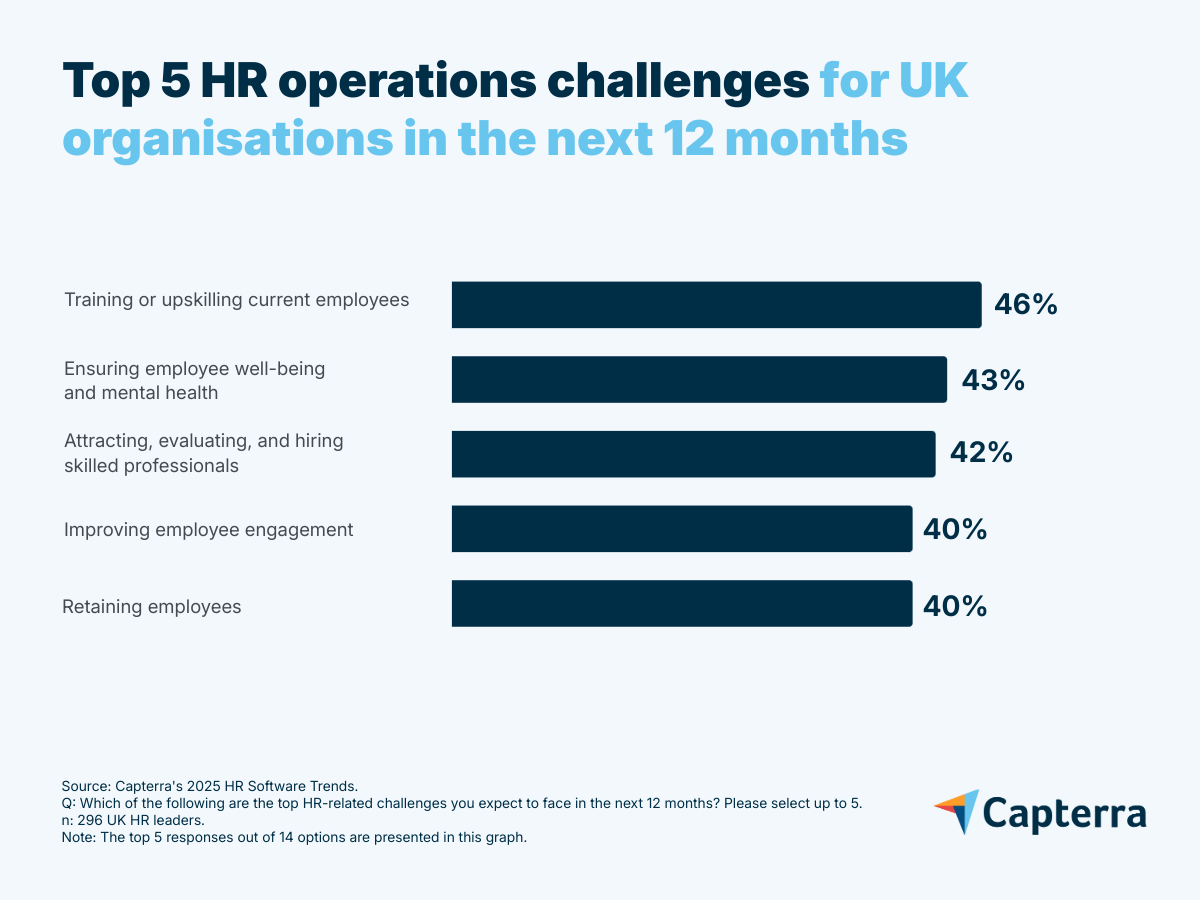
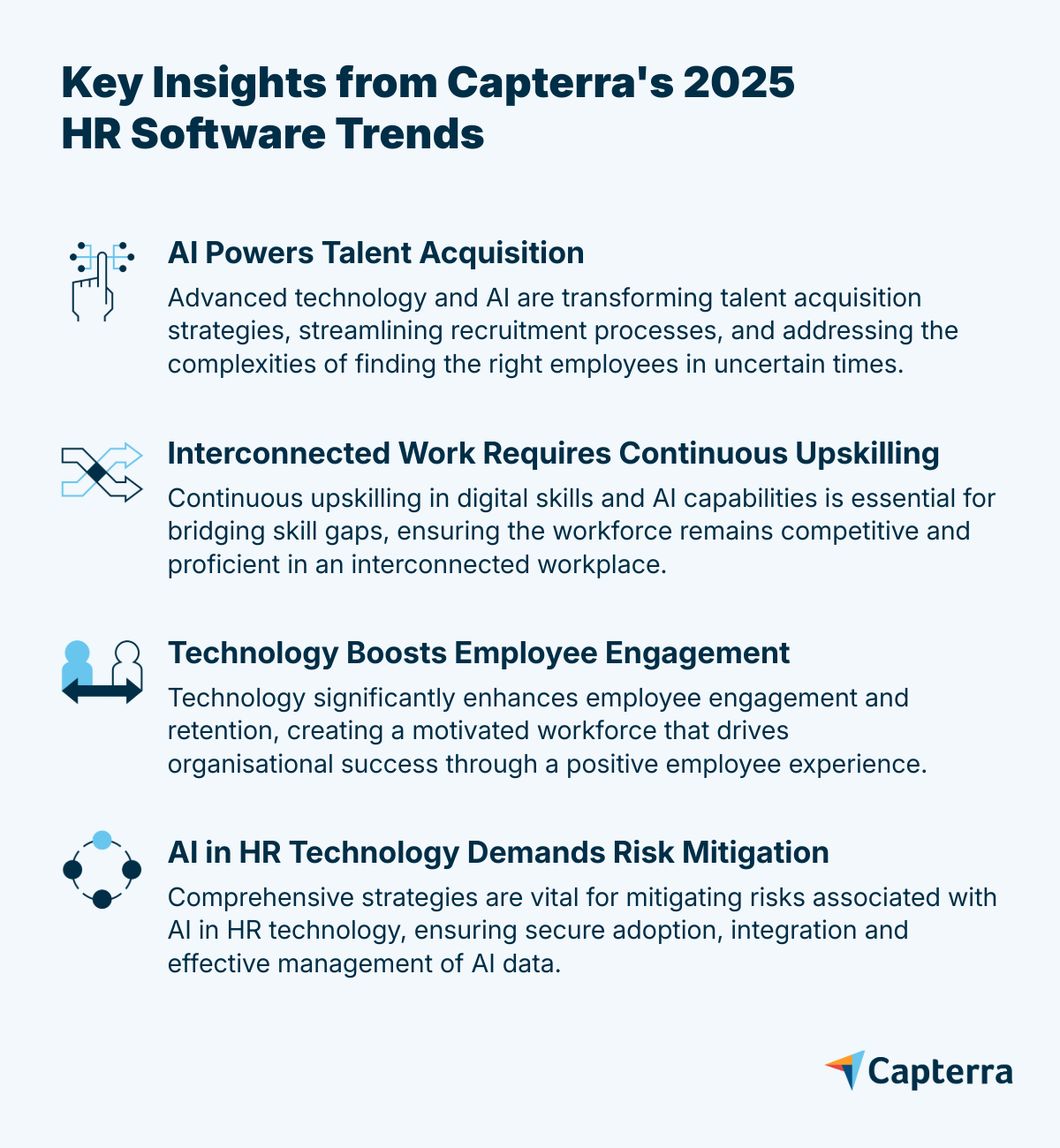
Key Insight 1: AI Powers Talent Acquisition
The challenge
Finding the right employees in complex times requires innovative approaches. With recruiting costs rising and a demand for skilled professionals, organisations must adapt their strategies using technology enhanced with AI, which aids in talent analytics, volume of applications, candidate experience, and better recruitment outcomes.
Brian Westfall [1], HR technology expert, notes that as the job market shifts, there will be a surge in applicants for each job opening, adding complexity to the screening and hiring process. He highlights that recruiting involves more than just identifying top candidates; it's about engaging with job seekers to prevent pipeline dropouts and ensuring the best candidate experience possible throughout the process.
What UK HR leaders tell us
- 46% identify training or upskilling employees as one of the top HR challenges in the next 12 months.
- 70% expect to increase their workforce in the next 12 months.
- 66% foresee recruiting costs increasing compared to last year.
- 29% think that HR/talent analytics is the process that benefits most from AI.
Why it matters
Efficiency is critical when you have less budget and fewer resources, and that's where software can help. Seven in ten HR leaders in the UK anticipate that their organisation’s workforce will grow in the next 12 months, but just half (52%) consider recruiting software critical, despite the process being one of the top challenges for organisations.
However, it is not only about having the technology. HR tools with AI features can help organisations recruit more efficiently and enhance the recruiter-candidate relationship, but soft skills are also needed to engage, connect, and provide a personalised experience to candidates.
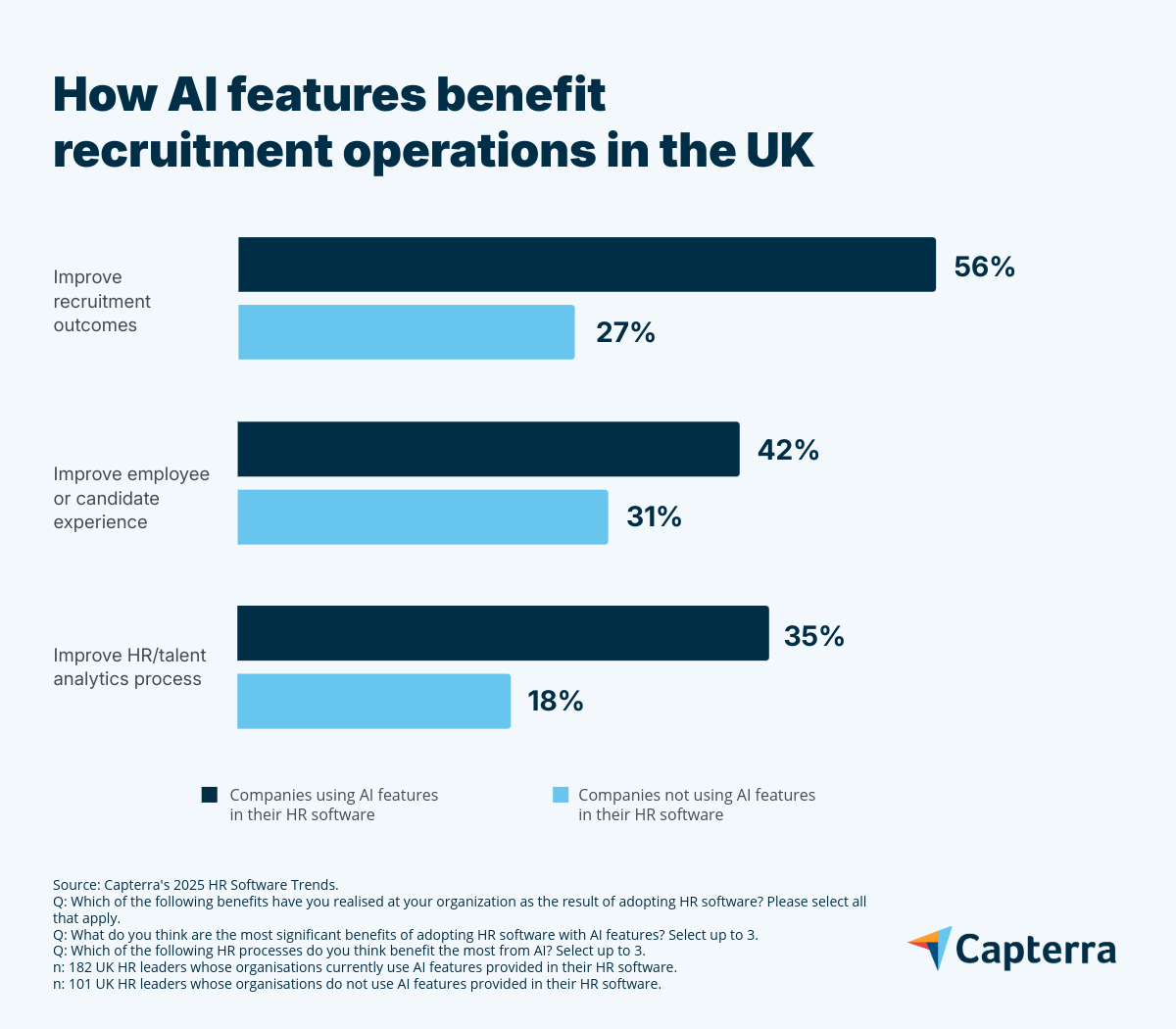
The opportunity
AI-driven recruiting improves efficiency, productivity and eventual hires by automating routine tasks and freeing recruiters' time to build quality candidate relationships. It optimises the identification of effective job posting sources and the selection of compatible candidates.
"AI can really help take over some of the more routine tasks. For example, the first initial screening interview, where you're getting the basic details from these job applicants. We're seeing chatbots taking over this step, which is really helpful, because the recruiters can then focus on those more tailored experiences for candidates further down in the pipeline."- Brian Westfall
Recommendations:
- Upgrade recruiting software/ATS with AI features to refine and speed up the early stages of applicant screening.
- Implement AI features in HR/talent analytics to enhance data analysis and candidate evaluation.
- Focus on candidate experience by continuously training your recruiters in soft skills.
-
When implementing AI in recruitment, consider:
- Using AI to support the process, not replace it: candidates still value human interaction and decision-making.
- Being transparent about how AI is used in the hiring process.
- Prioritising candidate experience by offering the option to connect with a human recruiter.
Software solutions
HR talent analytics: These tools help analyse recruitment data and identify compatible applicants. AI features enhance candidate evaluation by providing predictive insights and automating data analysis. Half (50%) of HR leaders in the UK rate this type of software as critical to their HR operations.
Recruiting software and ATS: Both software streamline the talent acquisition process, from sourcing to selection. AI features further improve efficiency by automating resume screening and enhancing candidate matching. 52% of UK HR leaders rate these types of software as critical to their HR operations.
Key Insight 2: Interconnected Work Requires Continuous Upskilling
The challenge
Upskilling is critical in an increasingly interconnected work environment, and 46% of UK HR leaders say they expect to face this challenge in the next 12 months. Moreover, organisations will also have to deal with complex software integration and enhance employees' AI skills.
According to Gartner’s report “Quick Pulse: Leader Sentiment on Skills Gaps,” [2] organisations are increasingly concerned about emerging skills gaps and their potential impact on performance and growth goals. 78% of HR leaders are worried about skills gaps at their organizations, and 56% are most concerned with deficiencies in digital skills. So, part of the challenge is also to identify where these gaps are.
"Identifying skills gaps in an organization can be hard, and you have to do that work in order to understand where to focus your efforts with your training and learning programs."- Brian Westfall
What UK HR leaders tell us
- 46% cite training and upskilling current employees as the main operational challenge in the next 12 months.
- 54% indicate training new users on HR software as the main software-related challenge in the next 12 months, compared to the global average of 48%.
- 75% expect that their training/upskilling costs will increase this year compared to last year, relatively higher than the global average of 68%.
- 42% highlight insufficient AI skills on staff as a challenge when adopting AI features.
Why it matters
Effective integration and skilled staff are crucial as companies juggle multiple systems. This is particularly an issue for UK HR professionals, with companies tending to use more software products than their international peers. On average, UK firms utilise five HR tools compared to an average of four globally. With AI boosting productivity, out-of-the-box software integration, and HR and AI expertise are essential for competitiveness.
Over six in ten (61%) of the surveyed HR leaders in the UK indicated that their organisation already uses AI features in its HR software, and their expectations of AI contribution to HR software have also increased compared to the global average, indicating a growing need for AI-specific skills. In “Agentic and AI Kick-Starter for CHROs”, [3] a Gartner report, HR leaders estimate that generative AI (GenAI) will impact 37% of the workforce and the way people work in the next two to five years.
However, only 45% of HR leaders consider training resources critical when researching software, even when the majority foresee an increase in costs in this field and are aware that they have to upskill their employees.
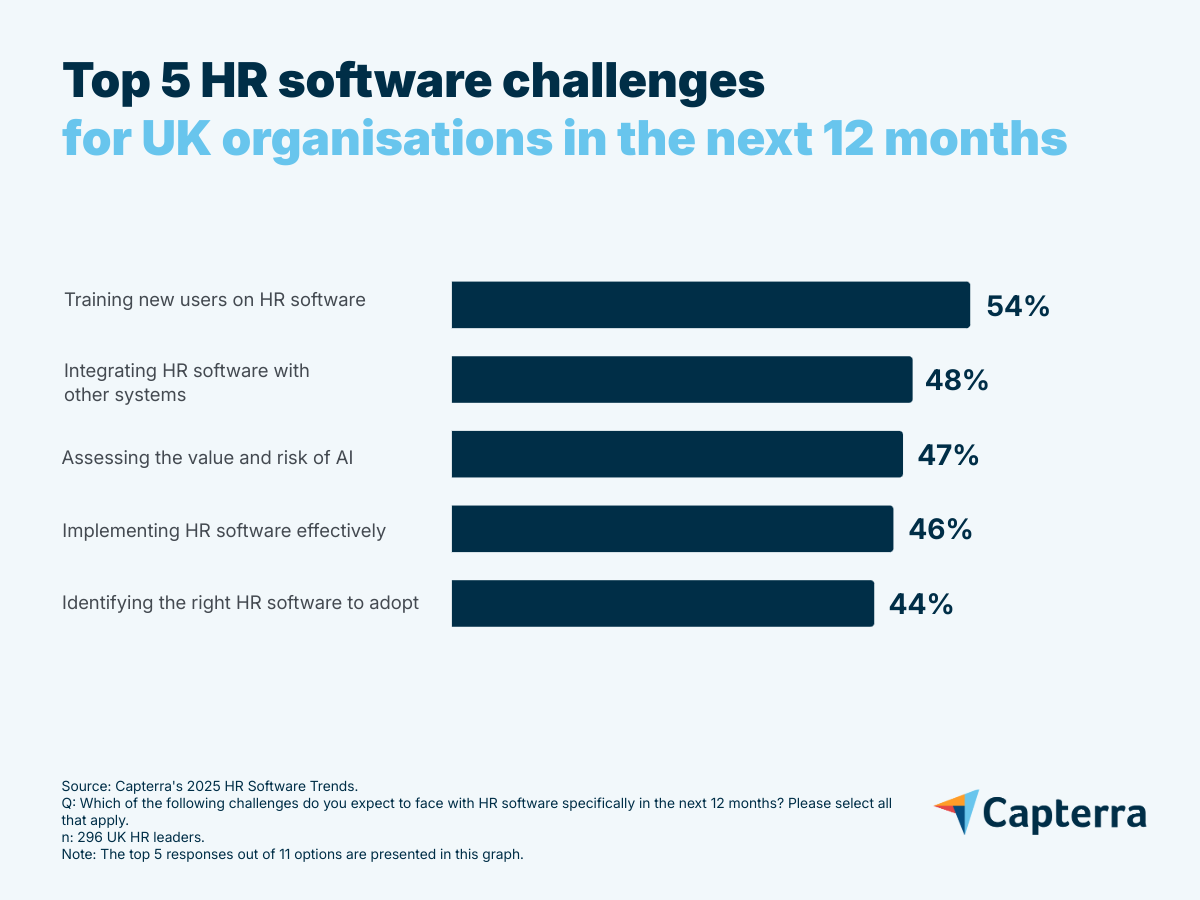
The opportunity
Organisations can address skills gaps and enhance productivity by focusing on upskilling initiatives and making sure they have effective software integrations, leveraging AI to support these efforts. In the current volatile and uncertain context, upskilling employees can be more productive and faster for companies than looking and hiring for specific roles.
"You see a lot of companies moving that budget from hiring more people towards upskilling, because that is going to be more cost-effective in the long run."- Brian Westfall
Recommendations:
- Ensure current or upgraded software integrates with the company's HR tech stack.
- Leverage talent management/analytics to ensure smooth software integration and optimise AI capabilities.
- Develop comprehensive training programs: Collaborate with leaders and software users to create ongoing upskilling initiatives.
- Invest in workforce training technology, focusing on integrations and AI features, and upgrade the software if needed.
- Regularly monitor the effectiveness of integrations and employee performance/skills.
Software solutions
Human resources information system (HRIS): This type of tool centralises HR data and supports integration with other systems. AI features help automate data sync and enable real-time insights. 55% of HR leaders in the UK rate this type of software as critical to their HR operations.
HR/talent analytics: These tools help identify and address employee skills gaps. AI features can help design personalised upskilling paths. 50% of UK HR leaders rate this type of software as critical to their HR operations.
Learning management system (LMS): This kind of system supports ongoing training and upskilling in HR software and AI skills. AI features can help create content and templates and personalise the user experience. 48% of HR leaders in the UK rate this type of software as critical to their HR operations.
Key Insight 3: Technology Boosts Employee Engagement
The challenge
Boosting employee engagement and retention is a top HR priority for HR leaders in the UK. Identifying the employee experience areas to improve is key, as it drives engagement and, in turn, increases retention.
"Engagement and retention are always going to be one of the biggest priorities for any HR department in any organisation. It comes down to really looking at the entire employee experience. Because employees will leave an organisation for a lot of different reasons."- Brian Westfall
Using and efficiently integrating tools like compensation software, employee engagement, and benefits administration is crucial for creating a motivated and committed workforce.
What UK HR leaders tell us
- 40% identify improving employee engagement, and retaining employees as among top HR challenges for this year.
- 55% of AI features users in HR software report that they help increase employee satisfaction or engagement, compared to only 38% of non-users of AI features.
- 45% of AI features users in HR software report that they help increase employee retention, compared to only 39% of non-users of AI features.
Why it matters
Retaining and engaging skilled employees is key as they are valuable assets who not only perform well but can also train others and drive organisational success. Losing them would mean incurring additional recruitment and training costs and efforts. It is essential to focus on strategies that keep key employees motivated and committed by enhancing their overall experience within the organisation.
"Engagement and retention are always going to be a priority, right? When times are good, there are many job opportunities that give employees an excuse to leave one organisation for another. And then, when industries are struggling, that's also an excuse for employees to leave that industry. So companies are always hyper-aware of how to engage and retain their employees."- Brian Westfall
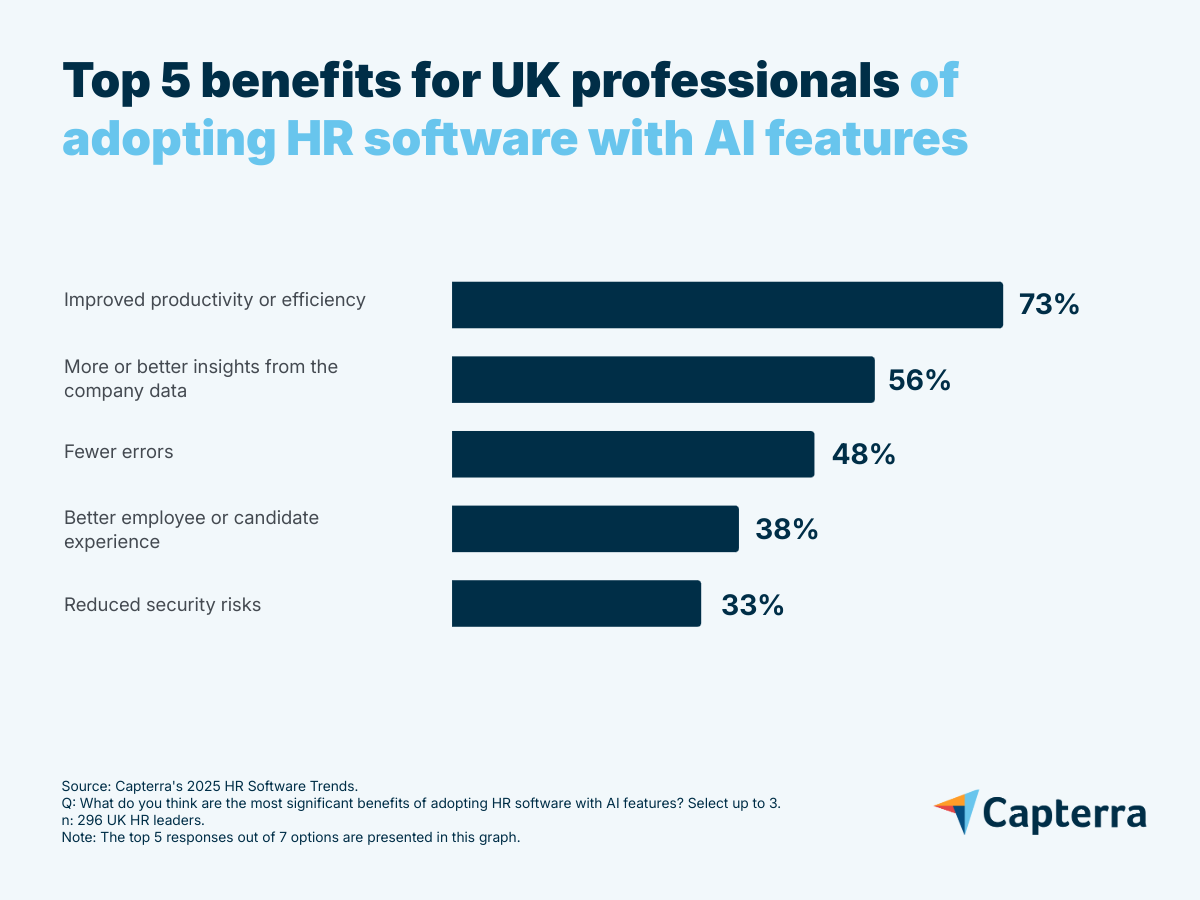
The opportunity
By leveraging technology, organisations can significantly enhance employee engagement and retention. Adopting HR software has led to higher satisfaction and retention rates, while AI features enable the software to provide better insights and, ultimately, enhance employee experience.
Recommendations:
- Brian Westfall recommends regularly conducting surveys to assess engagement levels, pinpoint areas for improvement, and continuously monitor the employee experience (benefits, learning, and growth opportunities). This can help develop plans to enhance employee engagement.
-
According to Gartner’s “2025 HR Technology Employee Experience Bullseye” report [4], to improve employee experience, HR leaders should:
- Identify which HR tasks employees prefer to handle in person versus through self-service platforms to better meet their needs and enhance their experience.
- Invest in internal career sites and talent marketplaces to support career growth and retention.
- Focus on user-friendly HR tech to conveniently gather employees' sentiment.
- Promote well-being tool adoption by tailoring offerings to generational preferences, with a focus on mental well-being tools for millennial and Gen Z employees.
-
To support employee retention, HR leaders can leverage the following strategies:
- Use performance management software to analyse employee performance, recognise and reward them accordingly with compensation management tools.
- Use benefits administration software to offer personalised advantages that meet employee needs and maintain work-life balance.
- Leverage talent management software to provide growth opportunities, encourage skill development, and foster career advancement, keeping top talent committed.
- Employees are more likely to stay engaged with the organisation if the management supports their career paths and helps them develop their skills.
Software solutions
Compensation management software: Design competitive pay structures to retain skilled employees. AI can help you benchmark compensation against market data and predict turnover risks based on pay satisfaction. 38% of UK HR leaders rate this type of software as critical to their HR operations, which is below the global average (45%).
Employee engagement software: Foster morale and recognise employee achievements. AI-driven nudges and recognition algorithms can help managers engage employees more consistently. 46% of HR leaders in the UK rate this type of software as critical to their HR operations.
Survey software: Collect employees' feedback on what they are missing to feel more engaged. AI features can analyse sentiment and discover patterns in employee concerns.
Key Insight 4: AI in HR Technology Demands Risk Mitigation
The challenge
Nearly half of UK HR leaders cite the assessment of AI value and risk (47%) and effective software implementation (46%) as top HR software concerns. In the UK, professionals are also more uneasy about the risk of privacy issues of using AI features in HR tools than in other countries surveyed. Aside from this and possible AI skills gaps among staff members, the main concerns for UK HR leaders regarding artificial intelligence are understanding AI decision-making and overcoming employee resistance to AI.
Organisations must understand the security risks associated with AI, as it will handle information provided from multiple sources (e.g., employees, clients, other software). Skilled employees and the right technology and processes will ensure data integrity.
"You don't want to rush with AI. You want to implement and use those features when you're ready as an organisation because you don't want to have AI working off bad data. You don't want your users using AI for things that they shouldn't."- Brian Westfall
What UK HR leaders tell us
- 46% in the UK expect effective HR software implementation to be a key challenge they face in the next 12 months.
- 47% are concerned with assessing AI's value and risks.
- 75% consider security a critical feature when researching HR software to acquire and implement, while 46% report that security concerns triggered HR purchases last year.
- 37% of AI users in the UK say reducing security risks is a benefit of adopting HR software with AI features.
Why it matters
AI features must rely on high-quality data and compliance, making data protection and an understanding of AI decision-making crucial for minimising risks. Successful HR software implementation prevents disruptions and secures data. Efficient integrations protect privacy by reducing vulnerabilities. AI literacy is key to understanding how AI works.
Jonah Shepp, Senior Principal, Research, at Gartner, warns that AI, especially generative AI, poses privacy, intellectual property, and trust risks. HR leaders should address these, as employee behaviour is key to preventing data leaks, which could have serious legal and reputational impacts. [5]
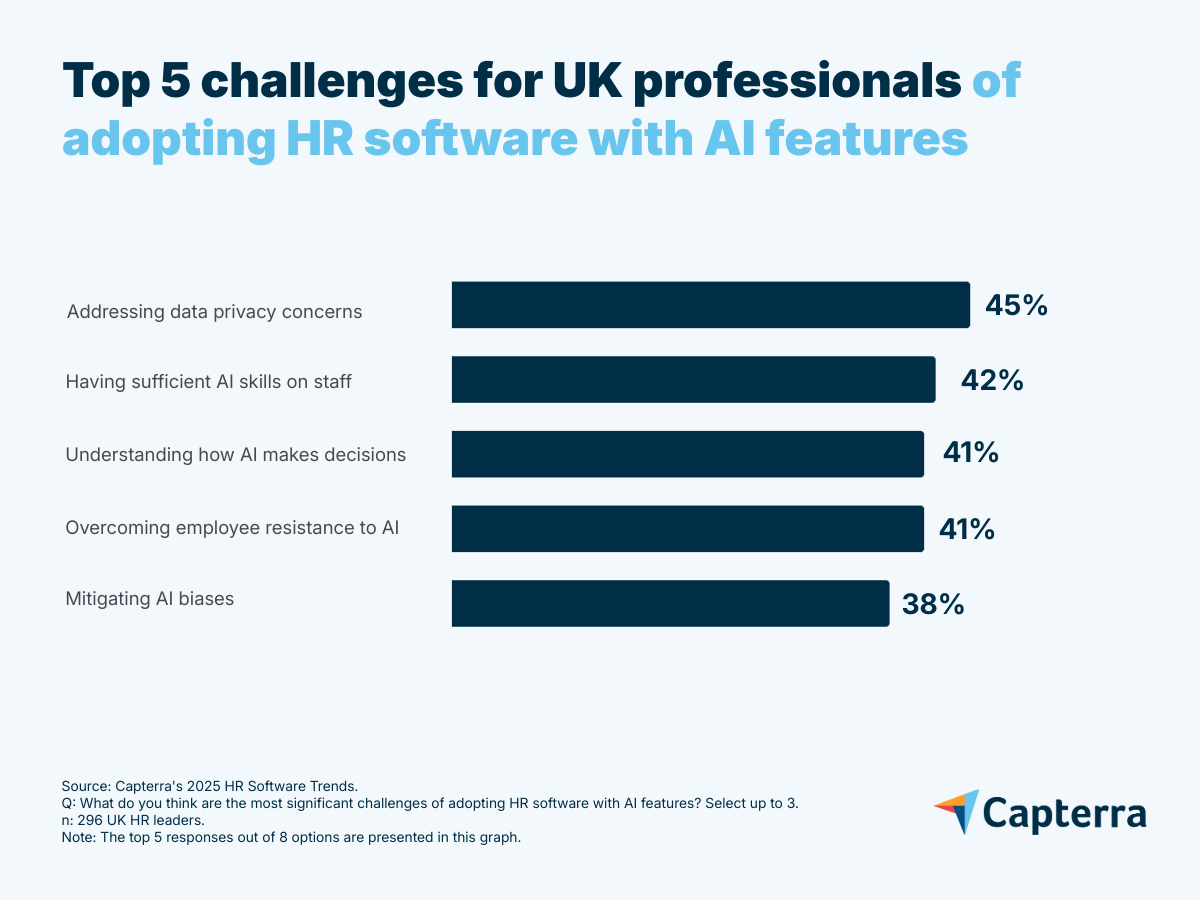
The opportunity
Implementing software properly, maintaining data quality, and understanding how AI works all help to mitigate risks of AI. HR software with AI features helps reduce security risks, but effective data privacy and management are also crucial for protecting sensitive information and ensuring compliance.
Eser Rizaoglu and Stephanie Clement, both Senior Director Analysts, state in Gartner’s “Agentic and AI Kick-Starter for CHROs” report [3] that cultivating AI literacy—the knowledge and skills to effectively work with AI—is essential for successfully scaling AI within an organisation. Without it, organisations are unlikely to achieve value creation with AI.
Recommendations:
- Ensure staff effectively use HR software integrations and understand AI functionalities; implement training programs if necessary.
- Conduct comprehensive data audits to verify data quality, correct usage, and alignment with business expectations.
- Revise data policies to ensure high-quality input and compliance with privacy rules, crucial for both general and AI-enhanced systems.
- Upgrade security features in HR software to safeguard employee data and manage AI-related risks; consider changing the product if necessary.
- Establish clear usage guidelines and regularly assess software functionality and ease of use to improve productivity and reduce user errors.
Software solutions
HR/talent analytics: Leverage these tools to help analyse and improve employee data governance policies aligned with AI data usage. AI features can generate role summaries and risk insights to help organisations quickly evaluate whether user-role assignments are appropriate and compliant. 50% of HR leaders in the UK rate this type of software as critical to their HR operations.
Learning management system (LMS): Use LMS to train employees on data collection and AI usage. AI can personalise learning paths based on employee roles and knowledge gaps, ensuring targeted upskilling in data and AI literacy. 48% of UK HR leaders rate this type of platform as critical to their HR operations.
Data management software: Manage and ensure the quality of data used for the HR software and AI applications. AI features can automate data cleansing and validation processes, reducing human error and ensuring high-quality inputs for AI systems.
Data privacy software: Monitor and enforce adherence to data privacy regulations. AI features help in real-time compliance tracking and automated enforcement of privacy policies.
Adapting HR to Technological Shifts
The future of HR will be defined by how well organisations adapt to rapid technological change and evolving workforce needs. Embracing AI, prioritising upskilling, and safeguarding data are now essential for success. HR leaders who act on these trends will be better equipped to attract, develop, and retain top talent. By keeping people at the centre of every tech decision, organisations can thrive in an increasingly complex world.
Note: The applications mentioned in this article are examples to show a feature in context and are not intended as endorsements or recommendations.
Sources
- Brian Westfall, LinkedIn
- Quick Pulse: Leader Sentiment on Skills Gaps, by Trisha Rai, February 2025, Gartner
- Agentic and AI Kick-Starter for CHROs, by Eser Rizaoglu and Stephanie Clement, June 2025, Gartner
- HR Technology Employee Experience Bullseye Report, 2025, by Nini Longoria, April 2025, Gartner
- HR Leaders Must Understand the Opportunities and Risks of Adopting AI and GenAI Technologies: Act Now to Prepare for the Future of Work, by Jonah Shepp, December 2024, Gartner
*Methodology
Capterra's 2025 HR Software Trends Survey was conducted in April 2025 among 3,256 respondents in Australia (n=278), Brazil (n=300), Canada (n=289), France (n=300), Germany (n=300), India (n=294), Italy (n=300), Mexico (n=300), Spain (n=300), the U.K. (n=296), and the U.S. (n=300). The goal of the study was to understand the HR software that companies are buying, their benefits and challenges, and the impact of AI on HR. Respondents were screened for employment at companies with more than one employee, working in management-level roles or above. Respondents were also confirmed to be at least partially responsible for HR software purchase decisions within their organisation.